Vibe Code An Application To Send And Receive Lightning Payments With Rizful
Want to build Lightning-powered applications without getting lost in the weeds? With Rizful test vaults and Nostr Wallet Connect (NWC), you can point your favorite AI coding assistant at a working example and let it help you build something awesome.
This guide shows you how to set up everything you need to vibe code Lightning payment functionality into your applications.
Vibe coding is a development approach where you use AI coding assistants (like Claude Code, GitHub Copilot, or Cursor) to rapidly build applications. You describe what you want, point the AI at relevant examples, and iterate quickly. With the right setup, you can build Lightning-enabled apps in minutes.
Skip the scaffolding: OpenReceive ships agent directions for WordPress + WooCommerce, Express, Fastify, Next.js, Rails, Django, FastAPI, Laravel, plain PHP, and BTCPay Server, plus an installable skill (npx skills add OpenReceive/openreceive, or /plugin install openreceive@openreceive in Claude Code). One prompt adds a Bitcoin checkout, with optional USDT, USDC, ETH, and SOL swaps. This guide is for when you want to build from the raw NWC primitives.
Prerequisites
Before you start vibe coding, you'll need:
- Two test Rizful vaults with NWC codes (one for sending, one for receiving)
- Docker and Docker Compose installed on your machine
- An AI coding assistant (Claude Code, Cursor, GitHub Copilot, etc.)
Step 1: Set Up Test Rizful Vaults
First, create dedicated test vaults to experiment with. This keeps your main funds safe while you learn and build.
👉 Safely Set Up Test Rizful Vaults with NWC — Create isolated vaults with small balances for testing
Create two vaults:
- One for sending payments (fund this one with ~100 sats)
- One for receiving payments
Step 2: Get NWC Codes for Both Vaults
Next, generate send-and-receive NWC codes for each of your test vaults.
👉 Get A Send & Receive NWC Code from Rizful — Learn how to create NWC codes that allow apps to send and receive payments
You'll need two NWC codes:
NWC_CODE_SENDER— from your sending vaultNWC_CODE_RECEIVER— from your receiving vault
Step 3: Test Your NWC Codes (Optional)
Before diving into code, you can verify your NWC codes work using the Alby Sandbox. This is a great way to understand how NWC works without writing any code.
Using Alby Sandbox
- Visit sandbox.albylabs.com
- Click on Payment Notifications in the sidebar
- Paste your sender NWC code into the "Alice" connection field
- Paste your receiver NWC code into the "Bob" connection field
- Click Connect on both
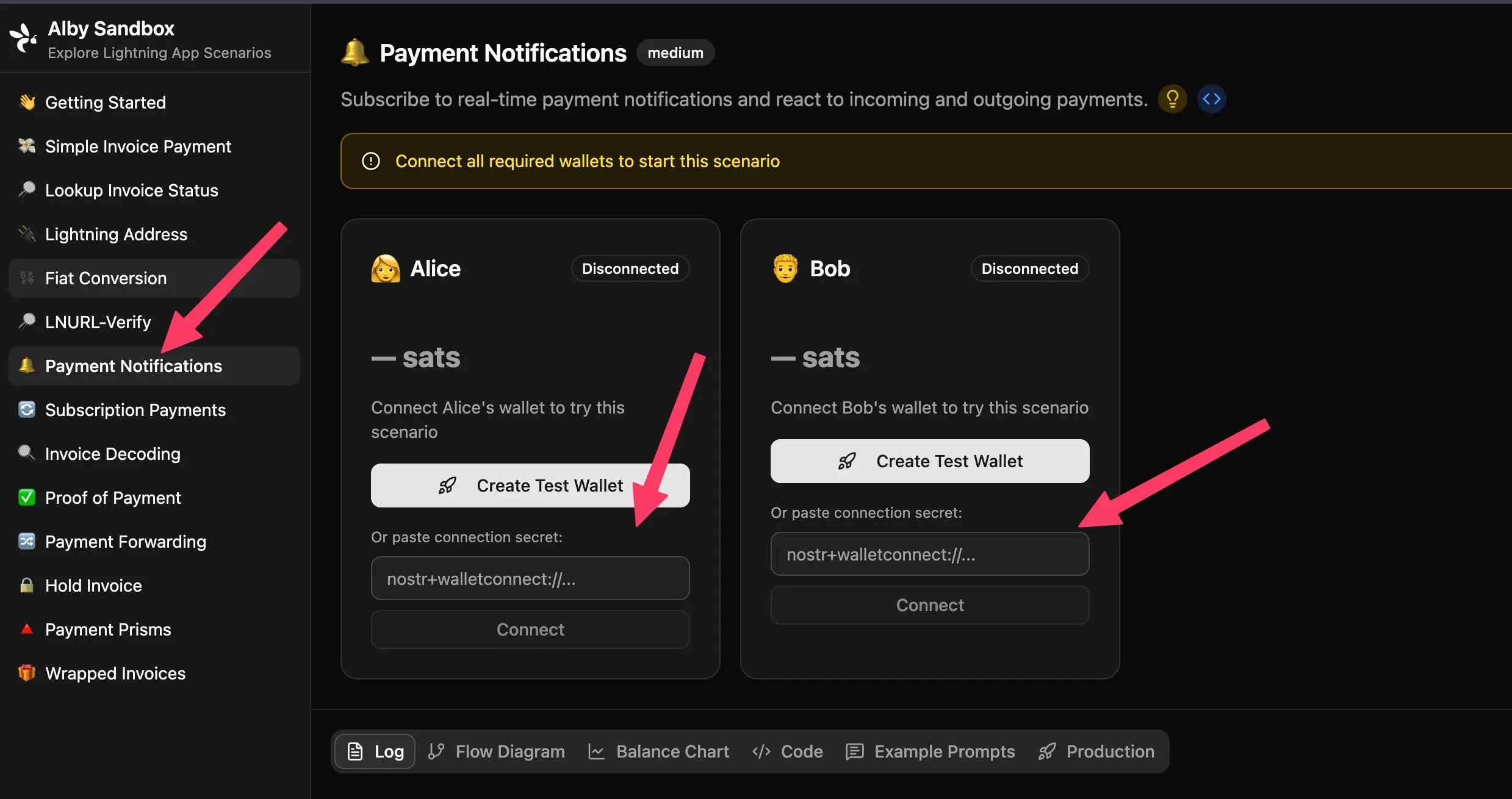
Now you can experiment with:
- ⚡ Payment Notifications — See real-time notifications when payments are sent/received
- 💸 Simple Invoice Payment — Create and pay invoices
- 🔍 Lookup Invoice Status — Check payment statuses
- 📊 Balance Chart — Monitor wallet balances
Step 4: Point Your AI at the Example Repository
Ready to build? Point your AI coding assistant at this repository:
👉 github.com/MegalithicBTC/rizful-lightning-vibe-code-example
This repository contains a minimal, working example that:
- Connects to two Lightning wallets via NWC
- Subscribes to payment notifications on both wallets
- Creates a 1 sat invoice from the receiver
- Pays the invoice from the sender
- Displays the notifications received by both wallets
Quick Start with the Example
# Clone the repository
git clone https://github.com/MegalithicBTC/rizful-lightning-vibe-code-example.git
cd rizful-lightning-vibe-code-example

# Create your secrets file
cp secrets.env.example secrets.env
Add Your NWC Codes
Edit secrets.env and add your two NWC connection strings:
NWC_CODE_SENDER=nostr+walletconnect://...
NWC_CODE_RECEIVER=nostr+walletconnect://...
Run the Demo
docker compose up --build
You should see output showing:
- ✅ Both wallets connecting
- 📝 Invoice creation
- 💸 Payment being sent
- 🔔 Notifications from both sender and receiver
- 💰 Updated balances
Step 5: Start Vibe Coding!
Now that you have a working example, you can ask your AI assistant to help you build features. Here are some prompts to try:
Simple Prompts
- "Modify this app to send 10 sats instead of 1 sat"
- "Add a loop that sends 1 sat every 30 seconds"
Intermediate Prompts
- "Create a web server that displays the current balance"
- "Add logging to a file for all payment notifications"
Advanced Prompts
- "Build a web interface that shows a QR code for the receiver's Lightning address and displays confetti when a payment arrives"
- "Create a payment forwarding feature that automatically sends received payments to another address"
- "Build a Lightning-powered tip jar with a leaderboard"
What You Can Build
With Rizful NWC codes and vibe coding, you can build:
| Application Type | Description |
|---|---|
| ⚡ Tip Jars | Accept Lightning payments with real-time notifications |
| 🤖 Payment Bots | Automate payments based on triggers or schedules |
| 📊 Dashboards | Monitor wallet balances and transaction history |
| 🎮 Games | Micropayment-enabled gaming experiences |
| 🛒 E-commerce | Accept Bitcoin payments in your apps — or use OpenReceive for a ready-made checkout |
| 🔔 Notification Systems | React to incoming/outgoing payments |
Resources
- 📚 Alby SDK Documentation — The SDK used in the example
- 🧪 Alby Sandbox — Test Lightning scenarios
- 📖 NWC Protocol Specification — Understand the protocol
- 🧾 OpenReceive — agent directions and skills for a complete checkout
The only dangerous part of this setup is your NWC codes. These codes give applications the ability to send payments from your vault.
- 🔐 Never commit NWC codes to version control — Use
.gitignoreto exclude yoursecrets.envfile - 🚫 Never share NWC codes publicly — Treat them like passwords
- 🧪 Use test vaults with small balances — Limit your exposure while experimenting
- 🗑️ Delete NWC codes when done — Remove unused connections from your Rizful vault
If you can avoid leaking your NWC codes, you're good! The example repository is already set up with a .gitignore that excludes secrets.env, so your codes won't accidentally get committed.