Accept Crypto On Your Website For Free (No KYC)
You can accept crypto on your website without signing up for a payment processor, adding an external payment API, storing exchange credentials, or building separate checkout flows for every blockchain.
The trick is to keep your merchant side simple: your backend creates one normal BOLT11 Lightning invoice using any Nostr Wallet Connect provider, then your checkout shows a small assistant that helps the customer pay that invoice from whatever asset they already hold.
That means you can use Rizful, Alby, LNbits, or any other NWC-compatible Lightning wallet. You get fast Lightning settlement, your server only tracks one invoice, and you avoid the messy parts of crypto checkout: slow confirmations, chain-specific APIs, address management, and juggling balances across multiple blockchains.
This page is the frontend checkout and payment wizard guide. Before adding it, implement the backend invoice flow for your stack:
- For Node.js web frameworks, use Accept Bitcoin Payments on Your Website or App with Rizful. It applies to Next.js, Remix, Astro, SvelteKit, Nuxt / Nitro, Express, Fastify, NestJS, Hono, Koa, AdonisJS, and similar Node.js server frameworks.
- For Ruby on Rails, use Accept Bitcoin Payments in Ruby on Rails.
Once your backend can create a BOLT11 invoice, track the payment_hash, and mark the order paid, use the frontend code below to display the invoice and help the customer pay it.
The first screenshot below shows the general PayInvoiceWizard experience.
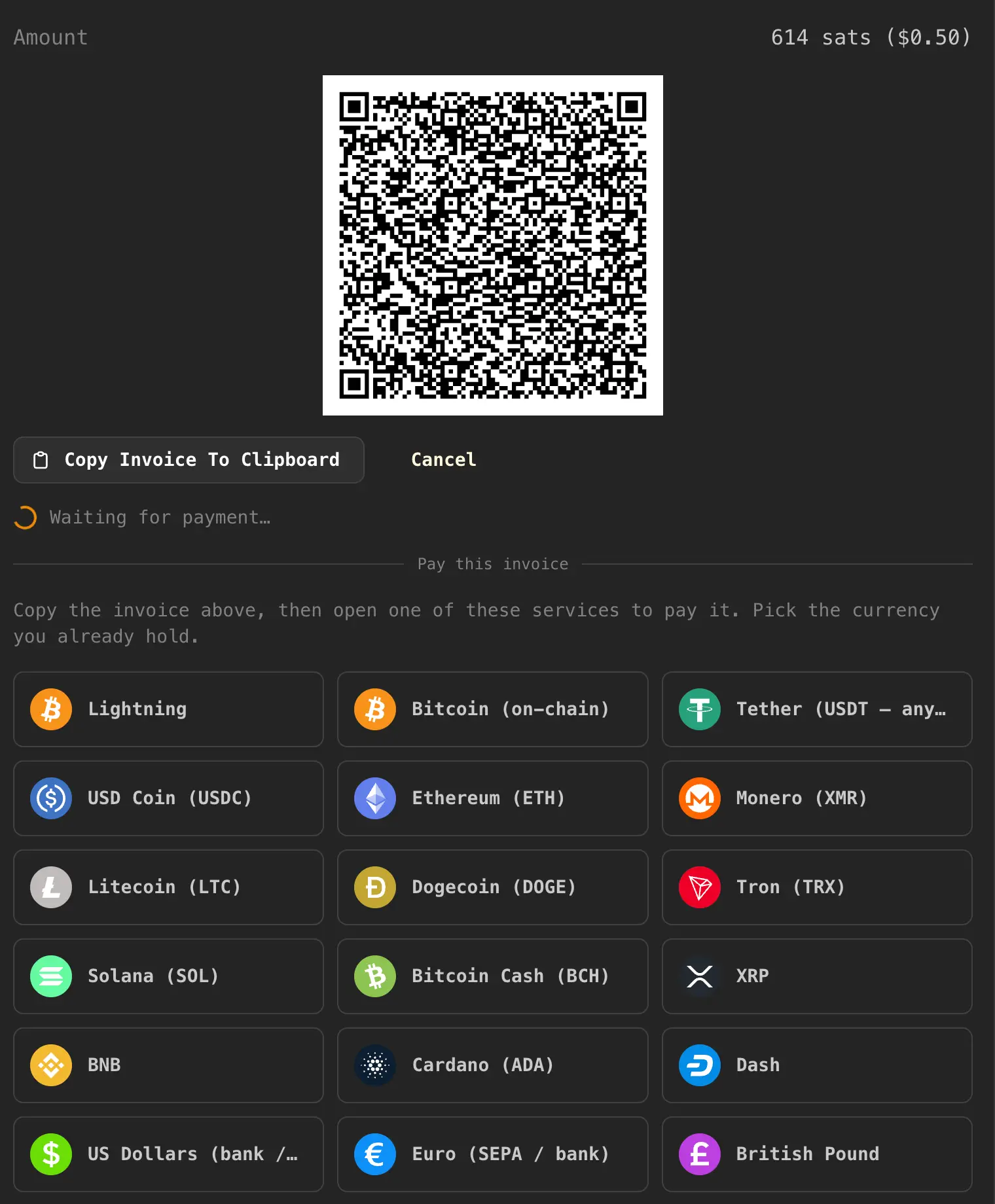
This example PayInvoiceWizard includes payment routes for common cryptocurrencies and balances, including Bitcoin Lightning, on-chain Bitcoin, Tether (USDT), USD Coin (USDC), Ethereum (ETH), Monero (XMR), Litecoin (LTC), Dogecoin (DOGE), Tron (TRX), Solana (SOL), Bitcoin Cash (BCH), XRP, BNB, Cardano (ADA), Dash, US dollars, euros, and British pounds.
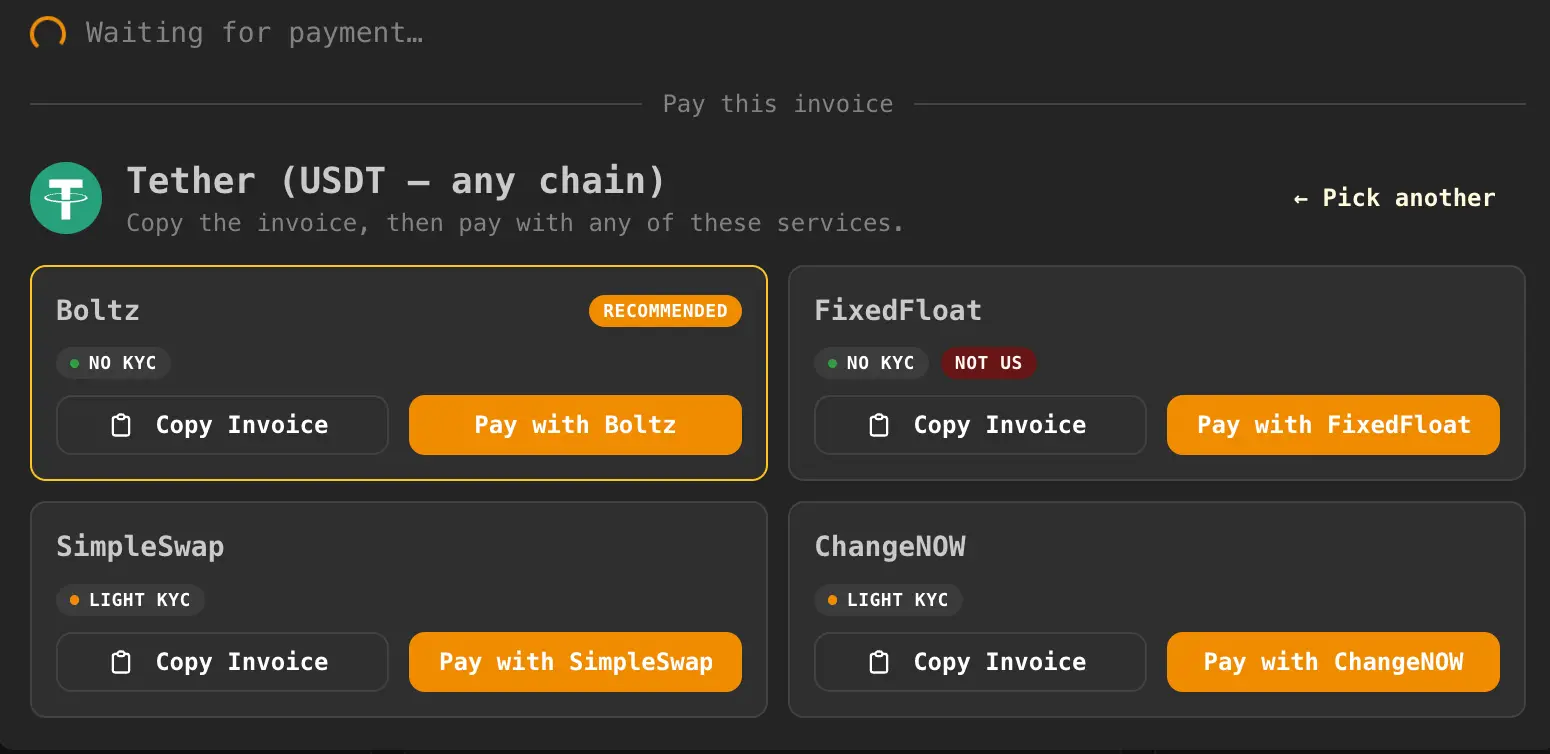
The second screenshot shows what the customer sees after choosing a payment method. Here, the customer selected Tether (USDT), so PayInvoiceWizard shows recommended services, a Copy Invoice button for the BOLT11 invoice, and a provider link to continue the payment.
The Two-Stage Build
This is a good job for an LLM or coding assistant because the work divides cleanly into two stages.
- First, implement the backend merchant flow: create a Lightning invoice, return the BOLT11 invoice to the frontend, check settlement, and mark the order paid. Use Accept Bitcoin Payments on Your Website or App with Rizful for Node.js web frameworks, or Accept Bitcoin Payments in Ruby on Rails for Rails. Note that using Rizful is optional: you can use any NWC backend. We also recommend Alby Hub.
- Then ask your coding assistant to build the
PayInvoiceWizardinterface below. The wizard is frontend code. It does not create invoices and does not touch wallet secrets. It only receives the BOLT11 invoice and helps the customer choose a practical route from their asset to Lightning.
The result feels like "accept any crypto," but your backend still only handles one clean Lightning payment path.
You do not need a crypto payment processor account, an exchange API key, a custody integration, or KYC just to start accepting payments. Your app creates a Lightning invoice through NWC, and the customer chooses the swap, wallet, or exchange route that fits them.
Lightning settles on Bitcoin, the most secure and battle-tested cryptocurrency network. Your app waits for one Lightning invoice, not confirmations across many chains, and successful payments usually confirm in under two seconds.
How PayInvoiceWizard Works
PayInvoiceWizard is an embedded assistant for a BOLT11 Lightning invoice. The app still creates and settles a normal Lightning invoice, but the wizard helps a user who holds some other asset find a practical route to pay that invoice.
The user copies the same BOLT11 invoice and then opens a recommended wallet, exchange, or swap service for the asset they already have.
The important implementation idea is this:
- The server creates one Lightning invoice and returns a BOLT11 string plus payment metadata.
LightningInvoiceModalshows the invoice QR code, copy button, amount, and payment status.PayInvoiceWizardreceives onlybolt11and provides asset-specific payment routes.- The browser does not poll the Lightning wallet. Settlement arrives through a server-pushed
payment-updatemessage. - When the
payment_hashin the update matches the currently open invoice, the modal switches to the paid state.
Dependencies
Install these packages or equivalents:
This example uses Rails and ActionCable to send websocket updates to the frontend, React on the frontend, mobx-keystone for client-side state, and Mantine for UI components.
You do not need to use any of these. Keep whatever frontend and backend frameworks your app already uses. Your coding assistant should be able to translate the same architecture into any stack: create one invoice on the server, display the BOLT11 invoice on the client, push or poll settlement updates, and switch the UI to paid when the matching payment_hash settles.
{
  "@mantine/core": "^9.1.0",
  "@tabler/icons-react": "^3.41.1",
  "@rails/actioncable": "^8.1.300",
  "cryptocurrency-icons": "^0.18.1",
  "mobx": "^6.15.0",
  "mobx-keystone": "^1.21.0",
  "mobx-react": "^9.2.1",
  "qrcode.react": "^4.2.0",
  "react": "^19.2.5",
  "react-dom": "^19.2.5"
}
File: helpers/cryptoIcons.ts
// Thin wrapper around the `cryptocurrency-icons` npm package. Uses the
// `color` SVGs in 128px; webpack 5 asset modules turn these into hashed URLs.
//
// Falls back to the bundled "generic" icon for anything we haven't mapped.

// Preload a curated slice of the 500+ icons so `iconForSymbol('btc')` is
// synchronous and we do not need dynamic imports at render time.
import btc from "cryptocurrency-icons/svg/color/btc.svg";
import eth from "cryptocurrency-icons/svg/color/eth.svg";
import usdt from "cryptocurrency-icons/svg/color/usdt.svg";
import usdc from "cryptocurrency-icons/svg/color/usdc.svg";
import xmr from "cryptocurrency-icons/svg/color/xmr.svg";
import ltc from "cryptocurrency-icons/svg/color/ltc.svg";
import doge from "cryptocurrency-icons/svg/color/doge.svg";
import trx from "cryptocurrency-icons/svg/color/trx.svg";
import bch from "cryptocurrency-icons/svg/color/bch.svg";
import sol from "cryptocurrency-icons/svg/color/sol.svg";
import xrp from "cryptocurrency-icons/svg/color/xrp.svg";
import bnb from "cryptocurrency-icons/svg/color/bnb.svg";
import ada from "cryptocurrency-icons/svg/color/ada.svg";
import dot from "cryptocurrency-icons/svg/color/dot.svg";
import dash from "cryptocurrency-icons/svg/color/dash.svg";
import matic from "cryptocurrency-icons/svg/color/matic.svg";
import usd from "cryptocurrency-icons/svg/color/usd.svg";
import eur from "cryptocurrency-icons/svg/color/eur.svg";
import gbp from "cryptocurrency-icons/svg/color/gbp.svg";
import generic from "cryptocurrency-icons/svg/color/generic.svg";

const REGISTRY: Record<string, string> = {
  btc,
  eth,
  usdt,
  usdc,
  xmr,
  ltc,
  doge,
  trx,
  bch,
  sol,
  xrp,
  bnb,
  ada,
  dot,
  dash,
  matic,
  usd,
  eur,
  gbp,
  generic,
};

export const iconForSymbol = (symbol: string): string => {
  const key = symbol.toLowerCase();
  return REGISTRY[key] ?? generic;
};
File: components/PayInvoiceWizard.tsx
import React, { useState } from "react";
import {
  Stack,
  Group,
  Text,
  Title,
  Button,
  SimpleGrid,
  Card,
  Badge,
  Divider,
  List,
  UnstyledButton,
  CopyButton,
  rem,
} from "@mantine/core";
import { IconClipboard, IconClipboardCheck } from "@tabler/icons-react";
import { iconForSymbol } from "../helpers/cryptoIcons";

/**
 * PayInvoiceWizard - interactive guide for paying a BOLT11 Lightning invoice
 * starting from an arbitrary crypto or fiat balance. Embedded in
 * LightningInvoiceModal when the user is in the "crypto" pay mode.
 *
 * Structure:
 *   1. "What currency do you have?" - crypto asset picker.
 *   2. Per-asset route recommendations with links.
 */

interface Provider {
  name: string;
  url: string;
  blurb: string;
  us?: boolean;
}

interface AssetRoute {
  symbol: string;
  label: string;
  summary: string;
  providers: Provider[];
  notes?: string[];
}

const RIZFUL: Provider = {
  name: "Rizful.com",
  url: "https://rizful.com",
  blurb: "Free, easy-to-use homebase for Bitcoin on Lightning.",
};

const ALBY_HUB: Provider = {
  name: "Alby Hub",
  url: "https://getalby.com/",
  blurb:
    "Run your own Lightning wallet backend with NWC support. A strong option if you want to use the same wizard with a self-managed NWC provider.",
};

const BOLTZ: Provider = {
  name: "Boltz",
  url: "https://boltz.exchange",
  blurb:
    "Atomic Lightning and USDT swaps via tBTC and USDT0 on Arbitrum. No account, no KYC, with service, DEX, and miner fees.",
};

const STRIKE: Provider = {
  name: "Strike",
  url: "https://strike.me",
  us: true,
  blurb:
    "Pays BOLT11 invoices directly from a USD or USDT balance using Lightning as settlement. Available in many countries.",
};

const AQUA: Provider = {
  name: "Aqua Wallet",
  url: "https://aqua.net",
  blurb:
    "Mobile wallet. Holds on-chain BTC, Liquid BTC, and USDT-Liquid; pays pasted BOLT11 invoices via internal swaps.",
};

const PHOENIX: Provider = {
  name: "Phoenix",
  url: "https://phoenix.acinq.co",
  blurb: "Lightning wallet with splicing for on-chain to Lightning conversion.",
};

const ZEUS: Provider = {
  name: "Zeus (+ ZEUS Swaps)",
  url: "https://zeusln.com",
  us: true,
  blurb:
    "Lightning wallet with ZEUS Swaps for bidirectional on-chain and Lightning moves.",
};

const COINBASE: Provider = {
  name: "Coinbase (Lightspark)",
  url: "https://coinbase.com",
  us: true,
  blurb:
    "Trade your altcoin to BTC, then withdraw over Lightning if your account and region support it.",
};

const KRAKEN: Provider = {
  name: "Kraken",
  url: "https://kraken.com",
  us: true,
  blurb: "Verified accounts can deposit and withdraw BTC via Lightning.",
};

const BINANCE: Provider = {
  name: "Binance",
  url: "https://binance.com",
  us: false,
  blurb:
    "Verified non-US accounts can withdraw BTC over Lightning where supported.",
};

const OKX: Provider = {
  name: "OKX",
  url: "https://okx.com",
  us: false,
  blurb: "CEX Lightning integration for supported accounts and regions.",
};

const BITFINEX: Provider = {
  name: "Bitfinex",
  url: "https://bitfinex.com",
  us: false,
  blurb: "Supports Lightning BTC withdrawals for eligible accounts.",
};

const KUCOIN: Provider = {
  name: "KuCoin",
  url: "https://kucoin.com",
  us: false,
  blurb:
    "Offers a Lightning option in the BTC withdrawal flow where supported.",
};

const CASHAPP: Provider = {
  name: "Cash App",
  url: "https://cash.app",
  us: true,
  blurb:
    "US-only. Can send and receive Lightning payments from supported accounts.",
};

const RIVER: Provider = {
  name: "River Financial",
  url: "https://river.com",
  us: true,
  blurb:
    "Bitcoin-only US exchange with Lightning withdrawals for eligible accounts.",
};

const COINCORNER: Provider = {
  name: "CoinCorner",
  url: "https://coincorner.com",
  us: false,
  blurb: "UK and Isle of Man focused exchange with Lightning support.",
};

const BULLBITCOIN: Provider = {
  name: "Bull Bitcoin",
  url: "https://bullbitcoin.com",
  us: false,
  blurb: "Canada and EU Bitcoin service with Lightning withdrawal paths.",
};

const RELAI: Provider = {
  name: "Relai",
  url: "https://relai.app",
  us: false,
  blurb: "European Bitcoin app with an embedded Lightning wallet.",
};

const ORANGEFREN: Provider = {
  name: "Orangefren",
  url: "https://orangefren.com",
  blurb: "Privacy-first aggregator filtered toward no-KYC swap partners.",
};

const SIMPLESWAP: Provider = {
  name: "SimpleSwap",
  url: "https://simpleswap.io",
  blurb: "No-account swap service; AML checks may trigger on some swaps.",
};

const CHANGENOW: Provider = {
  name: "ChangeNOW",
  url: "https://changenow.io",
  blurb:
    "Swap service that can receive many input assets and output to BTC Lightning where supported.",
};

const FIXEDFLOAT: Provider = {
  name: "FixedFloat",
  url: "https://fixedfloat.com",
  us: false,
  blurb:
    "Lightning-native swap service with fixed and floating rates. Check regional availability.",
};

const SIDESHIFT: Provider = {
  name: "SideShift.ai",
  url: "https://sideshift.ai",
  us: true,
  blurb:
    "No-account swap service with Lightning as an output option for supported users and amounts.",
};

const BITREFILL: Provider = {
  name: "Bitrefill",
  url: "https://bitrefill.com",
  us: true,
  blurb:
    "Accepts many crypto assets directly for gift cards and other purchases; useful as an alternate route.",
};

const BTC_EXCHANGES: Provider[] = [
  KRAKEN,
  COINBASE,
  BINANCE,
  OKX,
  BITFINEX,
  KUCOIN,
  RIVER,
];

const ASSETS: AssetRoute[] = [
  {
    symbol: "btc",
    label: "Lightning",
    summary:
      "You're already on Lightning. Scan the QR code above with any LN wallet or paste the BOLT11 invoice into it.",
    providers: [
      RIZFUL,
      ALBY_HUB,
      PHOENIX,
      ZEUS,
      AQUA,
      STRIKE,
      CASHAPP,
      ...BTC_EXCHANGES,
    ],
  },
  {
    symbol: "btc",
    label: "Bitcoin (on-chain)",
    summary:
      "Rizful pays Lightning invoices directly from on-chain BTC - no account, no KYC. Exchanges can also withdraw to Lightning if you already have a verified account.",
    providers: [
      RIZFUL,
      {
        ...BOLTZ,
        blurb:
          "Lightning and on-chain BTC swaps - paste the invoice and send BTC to the swap address.",
      },
      PHOENIX,
      ZEUS,
      AQUA,
      ...BTC_EXCHANGES,
    ],
  },
  {
    symbol: "usdt",
    label: "Tether (USDT - any chain)",
    summary:
      "Swap USDT to Lightning through a no-KYC swap service, or use a custodial option like Strike.",
    providers: [BOLTZ, FIXEDFLOAT, SIMPLESWAP, CHANGENOW],
  },
  {
    symbol: "usdc",
    label: "USD Coin (USDC)",
    summary: "Swap USDC to Lightning via a swap service, or use a CEX.",
    providers: [FIXEDFLOAT, SIMPLESWAP, CHANGENOW, COINBASE, KRAKEN],
  },
  {
    symbol: "eth",
    label: "Ethereum (ETH)",
    summary: "Direct altcoin to Lightning swap.",
    providers: [FIXEDFLOAT, SIMPLESWAP, CHANGENOW, SIDESHIFT, COINBASE, KRAKEN],
  },
  {
    symbol: "xmr",
    label: "Monero (XMR)",
    summary: "Route via a privacy-respecting swap service, ideally over Tor.",
    providers: [FIXEDFLOAT, ORANGEFREN, SIDESHIFT],
  },
  {
    symbol: "ltc",
    label: "Litecoin (LTC)",
    summary: "Swap service or CEX withdraw.",
    providers: [FIXEDFLOAT, SIMPLESWAP, CHANGENOW, SIDESHIFT, KRAKEN, COINBASE],
  },
  {
    symbol: "doge",
    label: "Dogecoin (DOGE)",
    summary: "Swap DOGE to Lightning, or spend on Bitrefill directly.",
    providers: [FIXEDFLOAT, BITREFILL, SIMPLESWAP, CHANGENOW, COINBASE, KRAKEN],
  },
  {
    symbol: "trx",
    label: "Tron (TRX)",
    summary: "Swap TRX directly to Lightning.",
    providers: [FIXEDFLOAT, SIMPLESWAP, CHANGENOW],
  },
  {
    symbol: "sol",
    label: "Solana (SOL)",
    summary:
      "Swap SOL to Lightning, or trade to BTC on a CEX and withdraw Lightning.",
    providers: [FIXEDFLOAT, SIMPLESWAP, CHANGENOW, SIDESHIFT, COINBASE, KRAKEN],
  },
  {
    symbol: "bch",
    label: "Bitcoin Cash (BCH)",
    summary: "Swap BCH to Lightning, or withdraw from a CEX.",
    providers: [FIXEDFLOAT, SIMPLESWAP, CHANGENOW, SIDESHIFT, KRAKEN, COINBASE],
  },
  {
    symbol: "xrp",
    label: "XRP",
    summary: "Swap XRP to Lightning.",
    providers: [FIXEDFLOAT, SIMPLESWAP, CHANGENOW, COINBASE, KRAKEN],
  },
  {
    symbol: "bnb",
    label: "BNB",
    summary:
      "Swap BNB to Lightning, or withdraw from Binance directly where available.",
    providers: [FIXEDFLOAT, SIMPLESWAP, CHANGENOW, BINANCE],
  },
  {
    symbol: "ada",
    label: "Cardano (ADA)",
    summary: "Swap ADA to Lightning, or trade to BTC on a CEX.",
    providers: [FIXEDFLOAT, SIMPLESWAP, CHANGENOW, COINBASE, KRAKEN],
  },
  {
    symbol: "dash",
    label: "Dash",
    summary: "Swap DASH to Lightning, or spend on Bitrefill directly.",
    providers: [FIXEDFLOAT, BITREFILL, SIMPLESWAP, CHANGENOW],
  },
  {
    symbol: "usd",
    label: "US Dollars (bank / card)",
    summary:
      "Strike can pay BOLT11 invoices directly from a cash balance. Cash App works for US users with Lightning support.",
    providers: [STRIKE, CASHAPP, RIVER, RELAI],
  },
  {
    symbol: "eur",
    label: "Euro (SEPA / bank)",
    summary:
      "Strike, Relai, and Bull Bitcoin can turn bank deposits into Lightning.",
    providers: [STRIKE, RELAI, BULLBITCOIN, COINCORNER],
  },
  {
    symbol: "gbp",
    label: "British Pound",
    summary: "CoinCorner and Strike both serve UK users.",
    providers: [COINCORNER, STRIKE],
  },
];

const ProviderCard: React.FC<{ provider: Provider; bolt11: string }> = ({
  provider,
  bolt11,
}) => (
  <Card withBorder padding="sm" radius="md">
    <Stack gap={8}>
      <Group justify="space-between" wrap="nowrap" gap="xs">
        <Text fw={600} size="sm" lineClamp={1}>
          {provider.name}
        </Text>
      </Group>
      <Text size="xs" c="dimmed" lineClamp={3}>
        {provider.blurb}
      </Text>
      <Group gap={6}>
        {provider.us === false && (
          <Badge size="xs" color="red" variant="light">
            Not US
          </Badge>
        )}
      </Group>
      <Group gap="xs" grow wrap="nowrap">
        <CopyButton value={bolt11}>
          {({ copied, copy }) => (
            <Button
              size="xs"
              variant="default"
              onClick={copy}
              leftSection={
                copied ? (
                  <IconClipboardCheck size={14} />
                ) : (
                  <IconClipboard size={14} />
                )
              }
            >
              {copied ? "Copied!" : "Copy Invoice"}
            </Button>
          )}
        </CopyButton>
        <Button
          size="xs"
          component="a"
          href={provider.url}
          target="_blank"
          rel="noopener noreferrer"
        >
          Pay with {provider.name}
        </Button>
      </Group>
    </Stack>
  </Card>
);

const AssetTile: React.FC<{ asset: AssetRoute; onSelect: () => void }> = ({
  asset,
  onSelect,
}) => (
  <UnstyledButton
    onClick={onSelect}
    style={{
      width: "100%",
      padding: rem(12),
      border: "1px solid var(--mantine-color-default-border)",
      borderRadius: "var(--mantine-radius-md)",
    }}
  >
    <Group gap="sm" wrap="nowrap">
      <img src={iconForSymbol(asset.symbol)} alt="" width={32} height={32} />
      <Text fw={600} size="sm" lineClamp={1} style={{ flex: 1, minWidth: 0 }}>
        {asset.label}
      </Text>
    </Group>
  </UnstyledButton>
);

interface PayInvoiceWizardProps {
  bolt11: string;
}

const PayInvoiceWizard: React.FC<PayInvoiceWizardProps> = ({ bolt11 }) => {
  const [selected, setSelected] = useState<number | null>(null);
  const asset = selected != null ? ASSETS[selected] : null;

  return (
    <Stack gap="md">
      <Divider label="Pay this invoice" labelPosition="center" />

      {!asset && (
        <>
          <Text size="sm" c="dimmed">
            Copy the invoice above, then open one of these services to pay it.
            Pick the currency you already hold.
          </Text>
          <SimpleGrid cols={{ base: 2, sm: 3 }} spacing="xs">
            {ASSETS.map((a, i) => (
              <AssetTile
                key={`${a.symbol}-${a.label}`}
                asset={a}
                onSelect={() => setSelected(i)}
              />
            ))}
          </SimpleGrid>
        </>
      )}

      {asset && (
        <Stack gap="sm">
          <Group justify="space-between" wrap="nowrap">
            <Group gap="sm" wrap="nowrap">
              <img
                src={iconForSymbol(asset.symbol)}
                alt=""
                width={36}
                height={36}
              />
              <Stack gap={0}>
                <Title order={4}>{asset.label}</Title>
                <Text size="xs" c="dimmed">
                  Copy the invoice, then pay with any of these services.
                </Text>
              </Stack>
            </Group>
            <Button
              variant="subtle"
              size="xs"
              onClick={() => setSelected(null)}
            >
              Pick another
            </Button>
          </Group>

          <Text size="sm">{asset.summary}</Text>

          <SimpleGrid cols={{ base: 1, sm: 2 }} spacing="xs">
            {asset.providers.map((p) => (
              <ProviderCard key={p.name} provider={p} bolt11={bolt11} />
            ))}
          </SimpleGrid>

          {asset.notes && asset.notes.length > 0 && (
            <List size="xs" c="dimmed" spacing={4}>
              {asset.notes.map((n, i) => (
                <List.Item key={i}>{n}</List.Item>
              ))}
            </List>
          )}
        </Stack>
      )}
    </Stack>
  );
};

export default PayInvoiceWizard;
File: components/LightningInvoiceModal.tsx
import React, { useContext } from "react";
import { observer } from "mobx-react";
import {
  Modal,
  Stack,
  Text,
  Group,
  CopyButton,
  Button,
  Center,
  Loader,
  ThemeIcon,
} from "@mantine/core";
import {
  IconCircleCheck,
  IconClipboard,
  IconClipboardCheck,
} from "@tabler/icons-react";
import { QRCodeSVG } from "qrcode.react";
import { AppWorkspaceContext } from "../stores/AppWorkspace";
import { centsToUsd, satsFmt } from "../helpers/constants";
import PayInvoiceWizard from "./PayInvoiceWizard";

// Settlement is delivered exclusively over ActionCable
// (AccountsChannel `payment-update`), which is fed by the server-side
// Lightning listener and poller tasks. The browser never talks to NWC nor
// polls invoice status. That keeps wallet details off the client.

const LightningInvoiceModal: React.FC = observer(() => {
  const workspace = useContext(AppWorkspaceContext);
  const invoice = workspace.lightningInvoice?.data;

  const close = () => workspace.setLightningInvoice(null, "");

  if (!invoice) return null;

  const settled = invoice.status === "succeeded";

  return (
    <Modal
      opened={true}
      onClose={close}
      title="Lightning invoice"
      size="xl"
      centered
    >
      <Stack gap="md">
        {workspace.lightningDescription && (
          <Text fw={600}>{workspace.lightningDescription}</Text>
        )}
        <Group justify="space-between">
          <Text c="dimmed">Amount</Text>
          <Text>
            {satsFmt(invoice.amount_sats)} sats (
            {centsToUsd(invoice.amount_cents)})
          </Text>
        </Group>
        {settled ? (
          <Center p="lg">
            <Stack align="center" gap="md">
              <ThemeIcon color="green" size={120} radius={120} variant="light">
                <IconCircleCheck size={96} stroke={2} />
              </ThemeIcon>
              <Text fw={700} size="xl" c="green">
                Invoice paid!
              </Text>
              <Text c="dimmed" size="sm">
                Your account has been credited.
              </Text>
              <Button size="md" color="green" onClick={close}>
                Close
              </Button>
            </Stack>
          </Center>
        ) : (
          <>
            <Center>
              <QRCodeSVG
                value={`lightning:${invoice.bolt11}`}
                size={260}
                includeMargin
              />
            </Center>
            <Group>
              <CopyButton value={invoice.bolt11}>
                {({ copied, copy }) => (
                  <Button
                    variant="default"
                    onClick={copy}
                    leftSection={
                      copied ? (
                        <IconClipboardCheck size={16} />
                      ) : (
                        <IconClipboard size={16} />
                      )
                    }
                  >
                    {copied ? "Copied!" : "Copy Invoice To Clipboard"}
                  </Button>
                )}
              </CopyButton>
              <Button variant="subtle" onClick={close}>
                Cancel
              </Button>
            </Group>
            <Group gap="xs" align="center">
              <Loader size="xs" />
              <Text size="sm" c="dimmed">
                Waiting for payment...
              </Text>
            </Group>
            <PayInvoiceWizard bolt11={invoice.bolt11} />
          </>
        )}
      </Stack>
    </Modal>
  );
});

export default LightningInvoiceModal;
File: helpers/types.ts
export interface LightningInvoice {
  payment_hash: string;
  bolt11: string;
  amount_sats: number;
  amount_cents: number;
  btc_usd_rate: number;
  expires_at: string;
  status: string;
}
Minimal Helper Functions Used By The Modal
The modal imports centsToUsd and satsFmt. If you are implementing this outside an existing app, these equivalents are enough:
export const centsToUsd = (cents: number): string =>
  new Intl.NumberFormat("en-US", {
    style: "currency",
    currency: "USD",
  }).format(cents / 100);

export const satsFmt = (sats: number): string =>
  new Intl.NumberFormat("en-US", { maximumFractionDigits: 0 }).format(sats);
File: stores/AppWorkspace.ts Integration
These are the invoice-related store fields and actions the modal needs. In the current app they live inside a larger mobx-keystone AppWorkspace model.
import { createContext } from "react";
import { model, Model, prop, modelAction, Frozen, frozen } from "mobx-keystone";
import { notifications } from "@mantine/notifications";
import { LightningInvoice } from "../helpers/types";

@model("twotensors/AppWorkspace")
export class AppWorkspace extends Model({
  lightningInvoice: prop<Frozen<LightningInvoice> | null>(null),
  lightningDescription: prop<string>(""),
}) {
  @modelAction
  setLightningInvoice = (
    invoice: LightningInvoice | null,
    description = "",
  ) => {
    this.lightningInvoice = invoice ? frozen(invoice) : null;
    this.lightningDescription = description;
  };

  @modelAction
  markLightningInvoiceSettled = (paymentHash: string) => {
    if (!this.lightningInvoice) return;
    if (this.lightningInvoice.data.payment_hash !== paymentHash) return;
    this.lightningInvoice = frozen({
      ...this.lightningInvoice.data,
      status: "succeeded",
    });
  };

  showSuccess = (message: string) => {
    notifications.show({ color: "green", title: "Success", message });
  };
}

export const AppWorkspaceContext = createContext<AppWorkspace>(
  new AppWorkspace({}),
);
Creating And Opening An Invoice From The Store
In this app, invoice creation is a server call. The server responds with the LightningInvoice shape above. After the response returns, call setLightningInvoice with a display description.
@modelFlow
createLightningInvoiceForPack = _async(function* (this: AppWorkspace, pack: CreditPackInfo) {
  this.areWeWaitingOnRails = true;
  try {
    const resp: LightningInvoice & { success?: boolean; message?: string } = yield* _await(
      sendToRailsController({ target: "pack", credit_pack_id: pack.id }, "/lightning/create_invoice"),
    );
    if ((resp as any).success === false) {
      this.showError((resp as any).message ?? "Could not create invoice.");
      return;
    }
    this.setLightningInvoice(resp, `${pack.name} (${pack.credits.toLocaleString()} credits)`);
  } finally {
    this.areWeWaitingOnRails = false;
  }
});

@modelFlow
createLightningInvoiceForPlanPass = _async(function* (
  this: AppWorkspace,
  plan: PlanInfo,
  days: LnPassDays,
) {
  this.areWeWaitingOnRails = true;
  try {
    const resp: LightningInvoice & { success?: boolean; message?: string } = yield* _await(
      sendToRailsController({ target: "pass", billing_plan_id: plan.id, days }, "/lightning/create_invoice"),
    );
    if ((resp as any).success === false) {
      this.showError((resp as any).message ?? "Could not create invoice.");
      return;
    }
    this.setLightningInvoice(resp, `${plan.name} - ${days}-day pass`);
  } finally {
    this.areWeWaitingOnRails = false;
  }
});
File: helpers/actionCable.ts
This is the browser-side settlement hook. The backend should broadcast { message: "payment-update", data: { payment_hash, status: "succeeded" } } when the Lightning invoice is paid.
ActionCable is Rails' built-in websocket framework. It lets the server push messages to browsers over a persistent connection instead of making the browser repeatedly ask, "is this invoice paid yet?" In this example, Rails uses ActionCable to push a payment-update event to the frontend when the backend sees the Lightning invoice settle.
If you are not using Rails, use the equivalent realtime feature in your stack. Common replacements include Socket.IO or native WebSockets in Node.js and Express, ws or server-sent events in Next.js, Django Channels in Django, Phoenix Channels in Phoenix/Elixir, Laravel Reverb or Laravel Echo in Laravel, SignalR in ASP.NET, and managed realtime services such as Supabase Realtime, Firebase, Ably, or Pusher.
The exact tool does not matter. Your coding assistant only needs to preserve the contract: when the server confirms payment, send a message to the active browser session containing the matching payment_hash and status: "succeeded", then update the open invoice UI to the paid state.
import { createConsumer, Consumer } from "@rails/actioncable";
import { AppWorkspace } from "../stores/AppWorkspace";

declare global {
  interface Window {
    __appCableConsumer?: Consumer;
  }
}

interface CableMessage {
  message: string;
  data: Record<string, any>;
}

export const startAccountsActionCable = (workspace: AppWorkspace) => {
  if (window.__appCableConsumer) return window.__appCableConsumer;
  const consumer = createConsumer();
  window.__appCableConsumer = consumer;

  consumer.subscriptions.create(
    { channel: "AccountsChannel" },
    {
      connected() {
        console.log("[cable] connected to AccountsChannel");
      },
      disconnected() {
        console.log("[cable] disconnected from AccountsChannel");
      },
      rejected() {
        console.warn(
          "[cable] subscription rejected - check current_account in connection.rb",
        );
      },
      received(payload: CableMessage) {
        console.log("[cable] received", payload?.message, payload?.data);
        if (!payload || !payload.message) return;
        switch (payload.message) {
          case "payment-update": {
            if (
              payload.data.status === "succeeded" &&
              payload.data.payment_hash
            ) {
              workspace.markLightningInvoiceSettled(payload.data.payment_hash);
              workspace.showSuccess("Payment received!");
            }
            break;
          }
          default:
            break;
        }
      },
    },
  );

  return consumer;
};
File: components/AppWorkspaceContainer.tsx Integration
Mount the modal once near the app root so any flow can open it by setting workspace.lightningInvoice.
import React, { useContext, useEffect } from "react";
import { observer } from "mobx-react";
import { AppShell, Container } from "@mantine/core";
import { AppWorkspaceContext } from "../stores/AppWorkspace";
import { startAccountsActionCable } from "../helpers/actionCable";
import LightningInvoiceModal from "./LightningInvoiceModal";

const AppWorkspaceContainer: React.FC = observer(() => {
  const workspace = useContext(AppWorkspaceContext);

  useEffect(() => {
    workspace.hydrateDataFromPage?.();
    startAccountsActionCable(workspace);
  }, [workspace]);

  return (
    <AppShell header={{ height: 60 }} padding="md">
      <AppShell.Main>
        <Container size="lg">{/* Main app pages go here. */}</Container>
      </AppShell.Main>
      <LightningInvoiceModal />
    </AppShell>
  );
});

export default AppWorkspaceContainer;
Backend Contract
The frontend expects invoice creation to return JSON like this:
{
  "payment_hash": "hex-or-provider-payment-hash",
  "bolt11": "lnbc...",
  "amount_sats": 12345,
  "amount_cents": 500,
  "btc_usd_rate": 40500.12,
  "expires_at": "2026-05-06T12:00:00Z",
  "status": "pending"
}
The backend should broadcast settlement like this when the invoice is paid:
{
  "message": "payment-update",
  "data": {
    "payment_hash": "same-payment-hash-as-open-invoice",
    "status": "succeeded",
    "settled_at": "2026-05-06T12:03:00Z",
    "kind": "credit_pack"
  }
}
Why The Copy Button Appears Before External Links
Most swap providers and exchanges need the BOLT11 pasted into their own UI. On mobile, opening a new tab or app can remove focus and make clipboard writes fail or feel unreliable.
Each provider card therefore puts Copy Invoice first, then Pay with {provider}. Copying after navigating away often drops focus and silently fails on mobile.
Security Note
The browser should never talk directly to the Lightning wallet, NWC relay, or payment provider secret APIs. It only receives the invoice payload and passive settlement updates from the server that WE control.
Wallet credentials and invoice polling or listening should stay on the server.