Best Crypto Payment Gateways: We Tried to Sign Up for BitPay, CoinGate and NOWPayments
Looking for the best crypto payment gateway? To make our video, we tried to sign up for three of the best known: BitPay, CoinGate and NOWPayments. Below is how far each one let us get, on their own screens and in their own words, with what they charge. Then one with no approval necessary: OpenReceive, taking a real payment. Everything here was checked on November 20, 2026.
BitPay's merchant side starts with a sales inquiry and a list of business documents; CoinGate asks for a seven-step business verification, with an ID check and four documents, before your first payment; NOWPayments let us in with an email, but its bitcoin invoice was on-chain, took 41 and 59 seconds to load in our tests, and it doesn't take Lightning at all. OpenReceive needs no approval: go to openreceive.org, click Copy agent directions, and paste them into your coding agent.
| Gateway | What it took before a first payment (what we saw on November 20, 2026) | Fee (its own pricing page) |
|---|---|---|
| BitPay | An identity check, then a sales inquiry to take payments; documents for Tier 2 approval (IDs of everyone owning 25% or more, business registration, a tax ID document, a utility bill, mortgage statement or lease) | 2% + 25¢ under $500,000 a month |
| CoinGate | Business verification: 7 steps, about 21 items, a live ID check and 4 documents; reviewed in 1-2 business days; asked again later | 1% |
| NOWPayments | An email (no fiat features); the bitcoin invoice was on-chain (no Lightning in its list of coins) and took 41 and 59 seconds to appear in our tests | 1% + network fee (1.5% with conversion) |
| OpenReceive | No approval necessary: it runs on your own website and pays into your own wallet | No cut (a stablecoin swap carries the swap provider's fee) |
BitPay
BitPay is the best-known name ("Leading crypto payments since 2011", on its business page). We signed up for a BitPay account, and its next step was an identity check: "Select type and issuing country of your identity document".
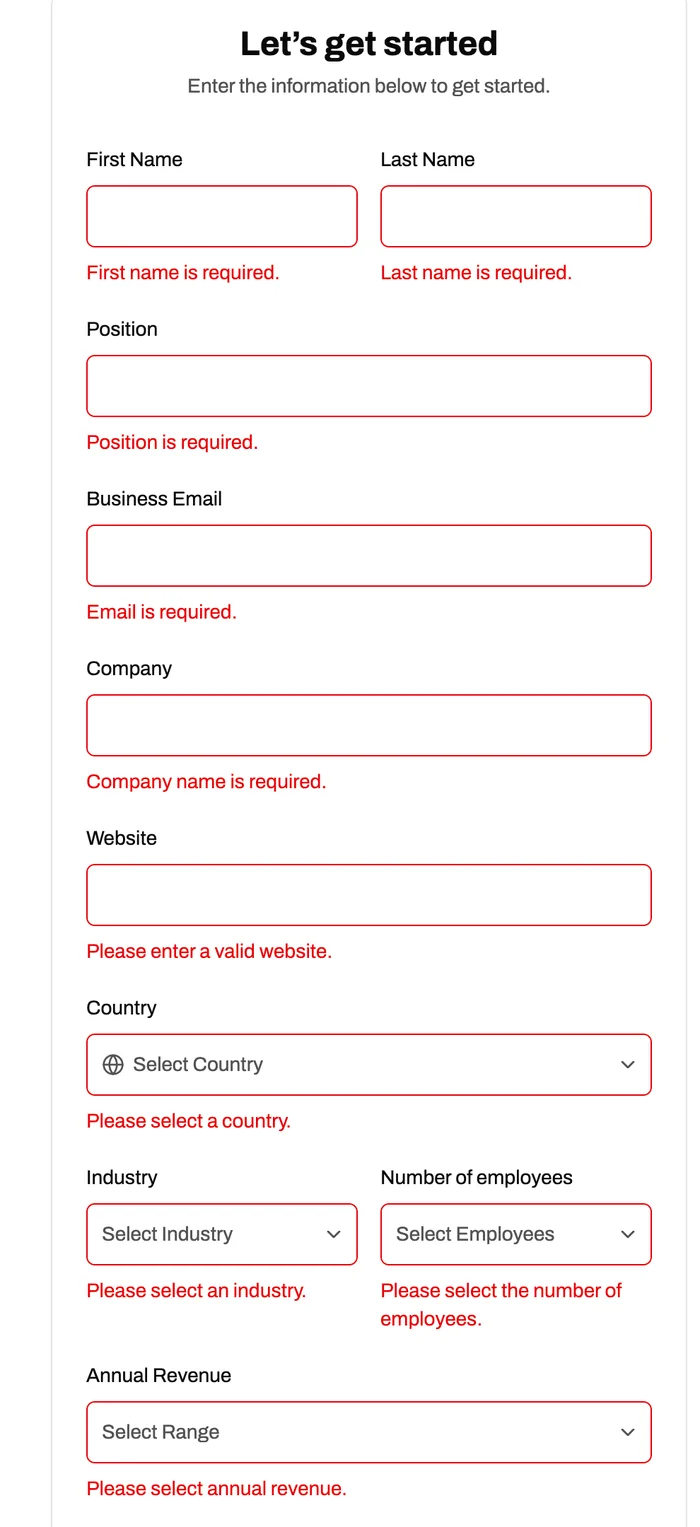
To take payments, its profile says: "BitPay for Businesses: Accept crypto with our powerful merchant tools. Get in touch and our sales team will get you set up." That opens a form, "Let's get started", where your position, business email, company, website, country, industry, number of employees and annual revenue are all required, ending in Send Inquiry. So with BitPay, taking payments starts with a sales inquiry.
BitPay's own compliance docs list what a merchant account takes. "When you initially set up your merchant account, you will be submitting documentation for tier 2 approval", and the documents for Tier 2 are:
- "Valid ID's for all persons with 25% or more direct or indirect interest in the business" (a driver's license, passport or national identity card)
- "Government Issued business registration"
- "Business Tax ID Verification document"
- a current utility bill or mortgage statement (dated within the most recent 90 days), or a current lease
Tier 2 is "$10,000 USD Daily / $500,000 USD Yearly"; higher tiers need further vetting. Its pricing: 2% + 25¢ a payment under $500,000 a month, 1.5% + 25¢ up to $1 million, 1% + 25¢ above ("Higher fees applicable for high-risk industries"). We didn't send the inquiry.
CoinGate
CoinGate let us make an account. Its home screen lists four steps ("Completed 0 of 4 steps"), and the last one, Take your first payment, says "After verification". Its welcome email says: "Verify your business to unlock crypto payments, settlements, and payouts - it only takes a few minutes."
The form has seven steps:
- Business details (9 items): company name, phone, legal type, company code, VAT number, a tax ID, registration date, and your business model and pricing described in at least 15 words each, industries and activities
- Intended use: accepting payments, sending payouts, moving your own funds
- Financial details: source of funds, annual revenue, and expected annual turnover through CoinGate
- Company structure (3 items)
- Live ID
- Upload documents (4)
- Review & submit
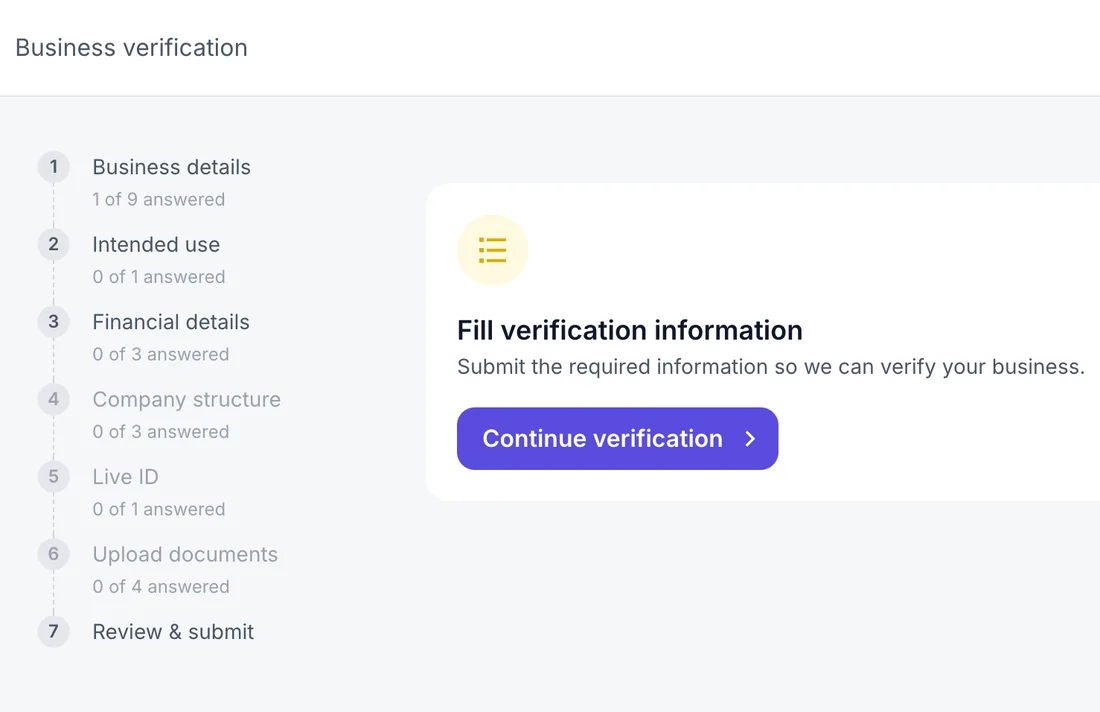
CoinGate's help centre says the review "usually takes 1-2 business days to review after all necessary documents are submitted", and that it doesn't end there: "As a regulated company in Lithuania, we are required to keep the information we hold about our customers accurate and up to date ... Your verification has an expiry date", after which it asks again for updated company documents, proof of address, renewed IDs, financial documents and the owners' source of funds and wealth (its articles "How long does the merchant verification process take?" and "Why is CoinGate asking me for documents again? (Ongoing Due Diligence)", read on November 20, 2026). Its pricing: 1% per transaction. We stopped at step three, with nothing submitted.
NOWPayments
NOWPayments was different: an email was enough to get in, and its dashboard opened straight away ("Your account is almost ready!"). We made a payment link for 5 USD in bitcoin (its minimum for BTC that day was 3.85 USD).
Then we opened the link, in a fresh browser, twice. In our tests on November 20, 2026, the page arrived in under a second, but the invoice took 41 and 59 seconds to appear. One day's measurement from one machine, not a rule, but long enough for a customer to wonder.
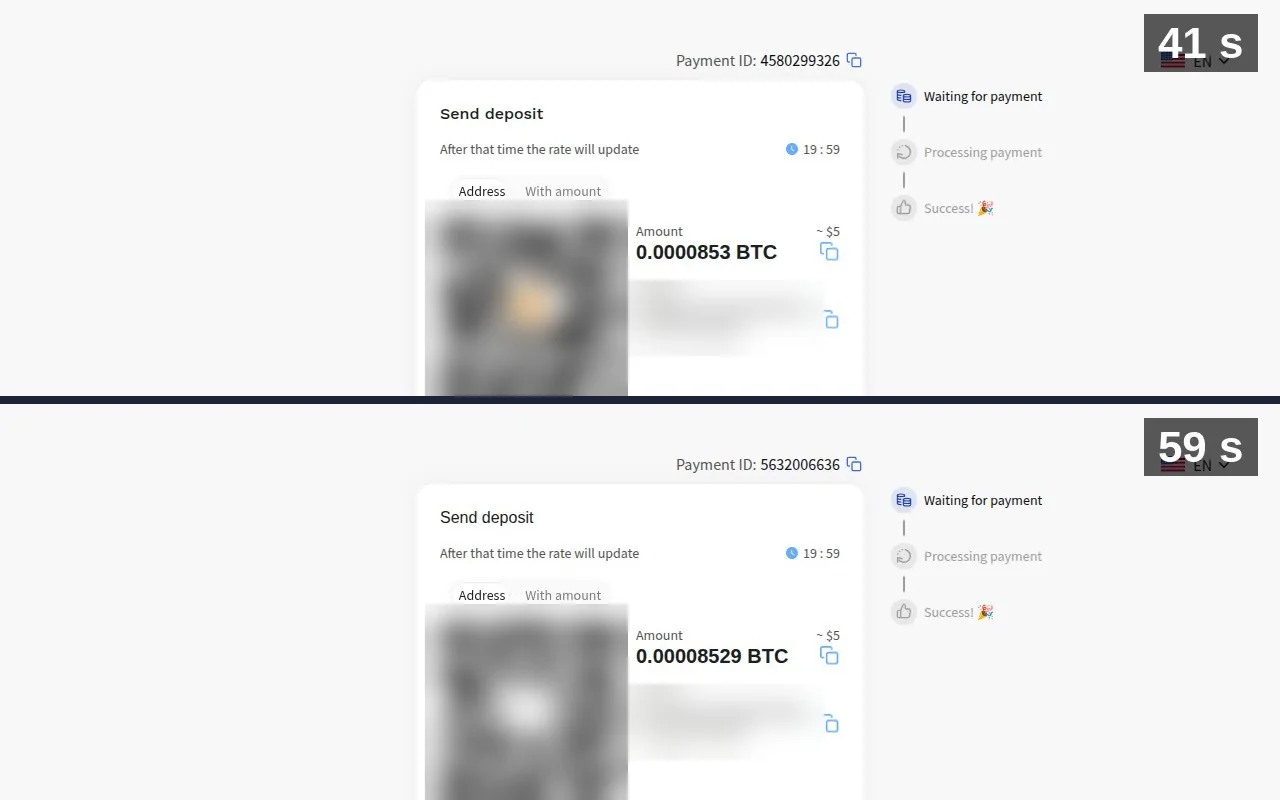
And the invoice was on-chain bitcoin: an address, not a Lightning invoice. NOWPayments doesn't take Lightning at all: its own list of supported coins has none, and its coin search answers "Sorry, no currencies found" for "Lightning" (checked on November 20, 2026). So the payment waits for the bitcoin network to confirm it, and that often takes an hour. In NOWPayments' own words (its blog, July 2022): "Many bitcoin companies, for example, need multiple confirmations ... On average, six confirmations take 60 minutes or an hour." Its pricing: "1% fee for payments without conversion + network fee", 1.5% for converted or fixed-rate payments.
OpenReceive: No Approval Necessary
OpenReceive works differently. It's free, open-source software that runs inside your own website and pays straight into your own wallet (a free Rizful account, or Alby Hub if you want your own node, with Megalith as its default channel partner). There's no application, and no one to approve your store: no approval necessary.
All you need to do is click Copy agent directions on openreceive.org and paste them into your coding agent. We tried it on our own WooCommerce store: the agent worked out it was WordPress with WooCommerce, asked for our Rizful wallet's receive-only code (a code that can create invoices but can't spend), installed OpenReceive from WordPress.org, and set it up.
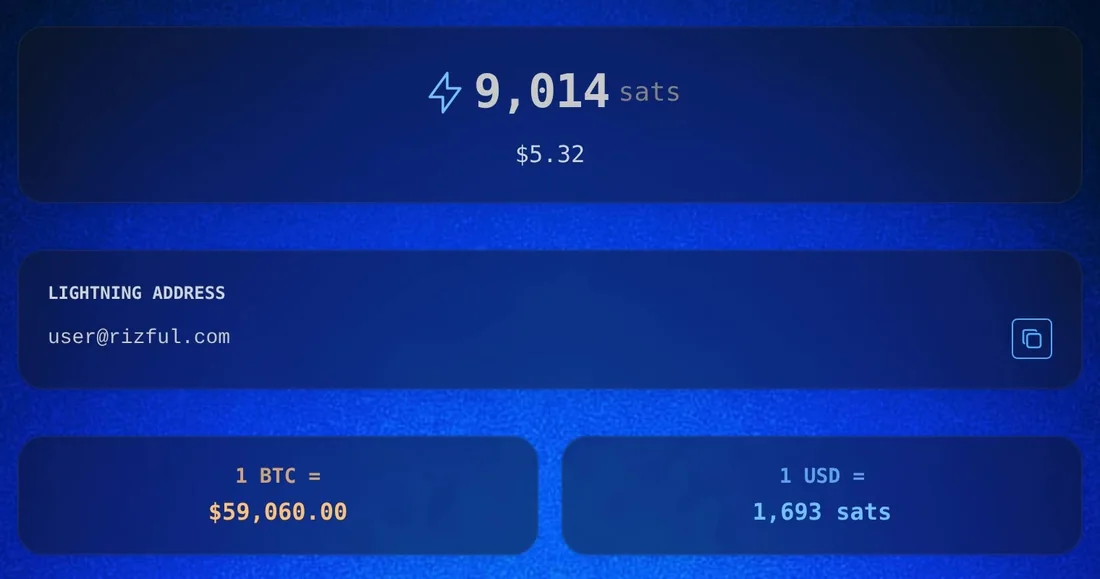
Then a real order: one Nub for $1.00, paid with Bitcoin. The store showed a Lightning invoice made by our own wallet, 1.6 seconds after Bitcoin was picked, for 1,693 sats. (Sat is short for satoshi, which is the smallest unit of bitcoin. There are a hundred million satoshis in a bitcoin.) We paid it from Alby Hub, and it landed in our Rizful wallet in seconds (7,321 sats before, 9,014 after), with no payment company in between. The store saw it paid, and the order went through.

Customers can pay in USDT or USDC too: a swap provider turns them into bitcoin, for its own fee (Lightning Swap: "Fees between 1.1% and 5% depending on market conditions. Fixed into each quote."), and you still get bitcoin. OpenReceive itself takes no cut ("OpenReceive is free software and takes no cut", its WordPress.org FAQ), and receiving into Rizful is free ("Receiving payments into your account is free", Rizful's FAQ).
It's crypto, not cards: if your customers want to pay by card, you'll still need a card processor.
Fair to All of Them
Getting through BitPay and CoinGate is definitely possible, but it's hard: you need your business documents and their approval. That's their process, as regulated companies, in their own words. We chose not to send ours. NOWPayments let anyone in with an email; what we saw there was speed, measured on one day, and an on-chain invoice with no Lightning.
Go to openreceive.org and click Copy agent directions. For the wallet, a free Rizful account takes a minute; Alby Hub gives you your own node.
Related
- Free, Open-Source Crypto Payment Gateway (Self-Hosted, Straight to Your Wallet)
- High-Risk Payment Processing: Get Paid Without a Merchant Account
- Stripe Alternatives: How to Get Paid When Stripe Says No
- What Is a Crypto Payment Processor? (And How to Get Paid Without One)
- How to Accept Crypto Payments on Your Website
- How to Accept USDT Payments on Your Website
- Coinbase Commerce Shut Down: How to Keep Accepting Crypto Payments