How to Buy and Sell Bitcoin on Cash App (and Cash Out)
To buy bitcoin on Cash App, open the Money tab, tap the Bitcoin tile, tap Buy, pick an amount and confirm. To sell, tap Sell instead: the dollars land in your Cash balance right away. To cash out, tap Withdraw on the Money tab and pick Standard (free, one to three business days) or Instant (a fee, to your debit card).
Want to spend your bitcoin anywhere, in seconds? Get a free Lightning address at rizful.com → Receiving is free.
| As of November 2026 | What Cash App charges | Source |
|---|---|---|
| Buy or sell (market order) | 2.0% from $1 to $499, 1.5% to $999, 0.9% to $1,999, 0% from $2,000; plus a spread of 0% to 0.75% in the price | Bitcoin Pricing |
| Cash out to your bank | Standard: free, 1 to 3 business days. Instant: 0.5% to 2.5% (minimum $0.25 to $1, maximum $75), to your debit card | Withdrawal Transfer Speed Options |
| Receive bitcoin over Lightning | free into your bitcoin balance; 0.9% if you turn on Receive Lightning as dollars | Lightning, Bitcoin Pricing |
| Lightning limit | up to $999 in bitcoin every 7 days, sending or receiving | Lightning |
Cash App changes its fees from time to time, and it shows the fee on the confirmation screen before you buy or sell. Everything on this page was read on Cash App's own help pages on November 20, 2026.
How to buy bitcoin on Cash App
- Tap the Money tab.
- Tap the Bitcoin tile.
- Tap Buy.
- Pick an amount, or tap ... to type one.
- Check the fee on the review screen, then confirm with your PIN or Face ID.
We bought $10 of bitcoin on November 20, 2026. The review screen showed every number before we confirmed: ₿16,513 for a $0.20 fee, which is 2% of $10.
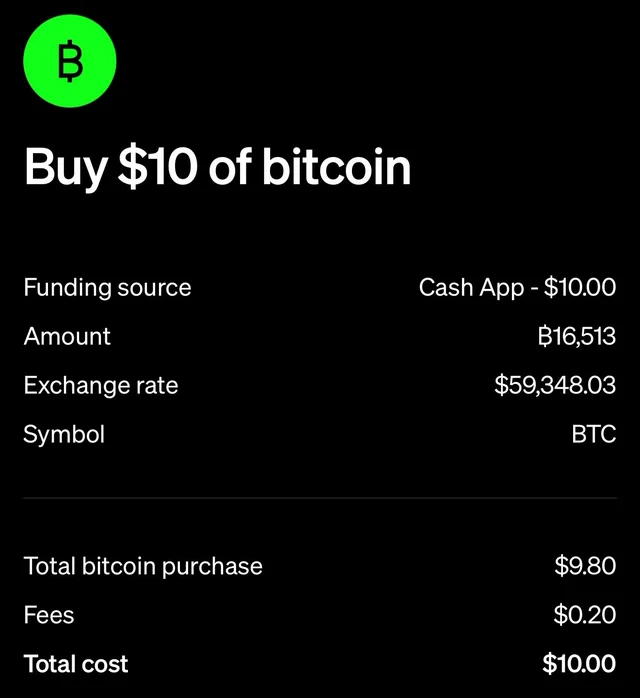
The exchange rate on that screen, $59,348.03, was a little above the $58,893.50 the Bitcoin screen showed seconds before: that difference is where the spread sits. After Confirm, Cash App said "You bought ₿16,513", and our bitcoin balance went from ₿1,203,597 to ₿1,220,110.
What it costs. For a market buy, Cash App's pricing page lists 2.0% on a purchase of $1 to $499. The price can also include a spread that "may be anywhere between 0% and 0.75%". Auto Invest, Round Ups and Paid in Bitcoin have no fee.
Cash App counts bitcoin in sats. Sat is short for satoshi, which is the smallest unit of bitcoin. There are a hundred million satoshis in a bitcoin. Cash App writes sats with the bitcoin sign, so ₿10,000 on its screen means 10,000 sats, not 10,000 bitcoin. More in What Is a Satoshi?
How to sell bitcoin on Cash App
- Tap the Money tab, then the Bitcoin tile.
- Tap Sell.
- Pick an amount, or tap ... to type one.
- Check the fee, then confirm.
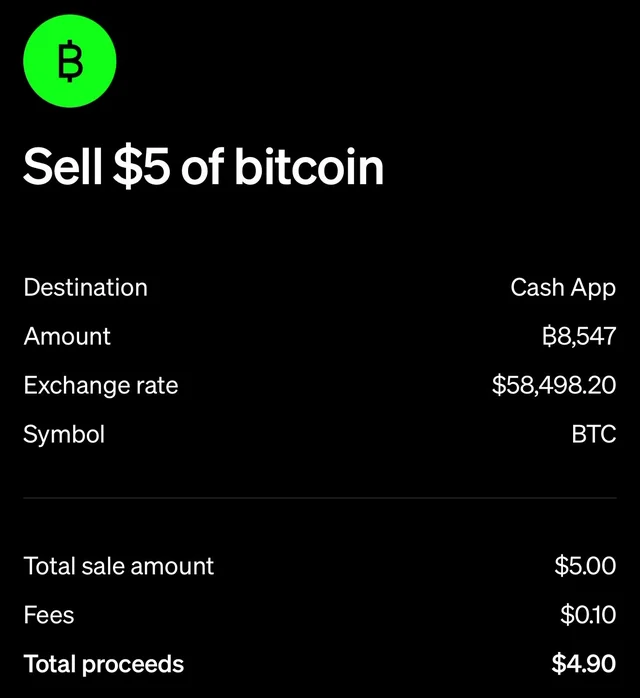
The dollars go to your Cash balance at once. Selling costs the same as buying: 2.0% under $500 for a market sell, plus the spread.
We sold $5 of it: ₿8,547 at $58,498.20 (a little below the market price this time), a $0.10 fee, $4.90 to the Cash balance.
How to cash out to your bank
- On the Money tab, tap Withdraw.
- Type the amount.
- Pick your bank account and the speed, then confirm.
"Standard transfers are free and usually arrive within 1–3 business days." "Instant transfers typically arrive immediately to your linked debit card and are subject to a 0.5%–2.5% fee (minimum $0.25–$1, maximum $75)" (Cash App). The app shows the exact fee before you confirm.
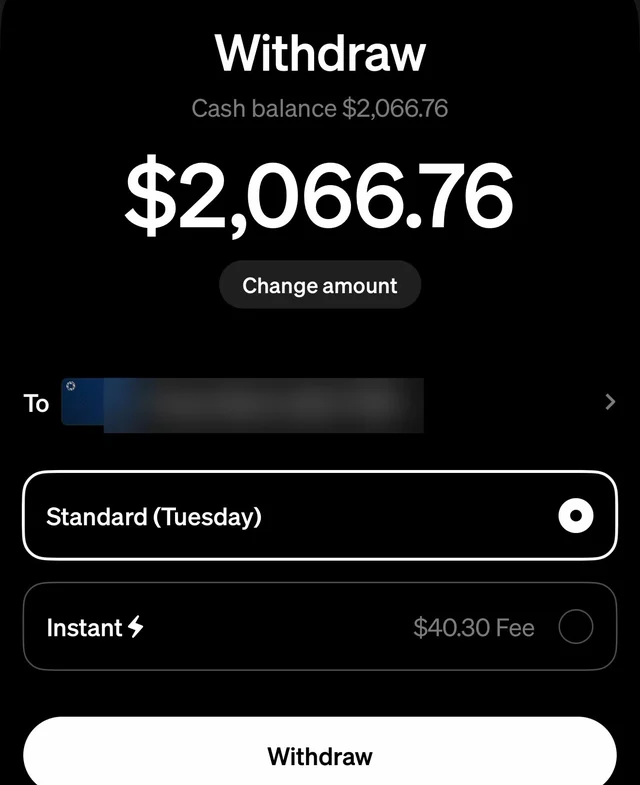
When we cashed out our whole Cash balance, $2,066.76, on a Friday, the screen offered Standard (Tuesday) for free or Instant for a $40.30 fee (about 1.95%). We picked Standard: "$2,066.76 will be available in your external bank account Tuesday."
Where is my bitcoin address on Cash App?
Open your bitcoin balance, tap the arrows (⇅), tap Receive, then the copy button at the top right. Cash App shows two things to copy: your Bitcoin address and a Lightning invoice. Tap the copy button next to Bitcoin address. (The same address is under Ways to use bitcoin, Deposit bitcoin: "Get your bitcoin address".)
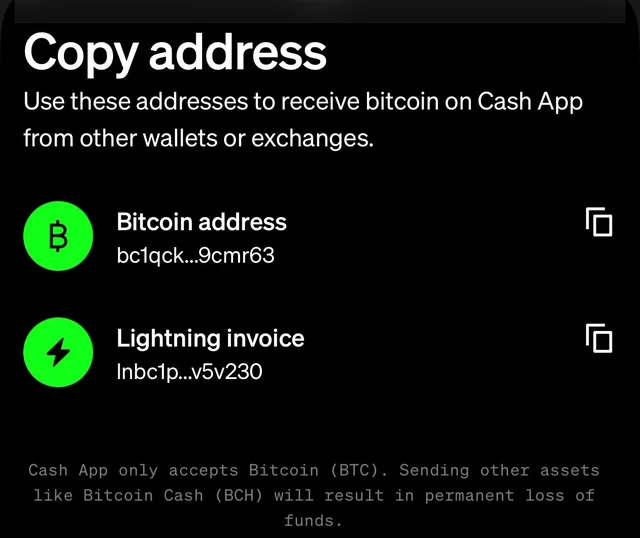
- Cash App's deposit addresses start with
bc1("P2WPKH Segwit addresses", Cash App). - It changes. "Your wallet address will change after each successful deposit. Check for the most recent address before making a transfer" (Cash App). Older addresses still belong to you, but copy the newest one each time.
- Check it before you share it. Paste it into Rizful's free Bitcoin Address Checker: it tells you if the address is valid and what kind it is.
How to send bitcoin to Cash App over Lightning
Over Lightning, your Cash App already has an address that looks like an email address: "Bitcoin sent to cashtag@cash.app will go to the Bitcoin Balance in your app" (Cash App), with your own $cashtag in place of "cashtag". Any Lightning wallet can pay it, and it arrives in seconds.
We sent 5,000 sats from a free Rizful account to our Cash App's Lightning address on November 20, 2026, at 2:40 PM Pacific. The bitcoin balance went from ₿1,211,563 to ₿1,216,563 in the same second Rizful said "Payment sent!", and Cash App listed it as "Bitcoin received, +$2.95, Fees $0.00, Lightning network". Rizful charged 12 sats for the send: a tenth of a percent (5 sats) plus 7 sats of routing.
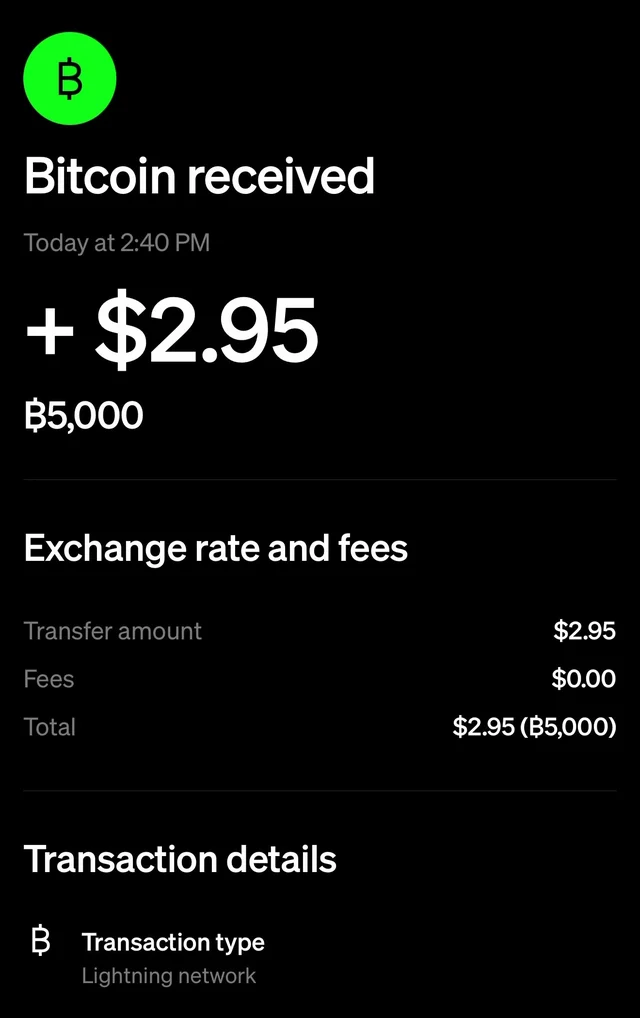
Lightning receiving "is not available to customers in New York", and the limit is $999 in bitcoin every 7 days.
Receive Lightning as dollars
Cash App can turn incoming Lightning payments into dollars as they arrive: "When Receive Lightning as dollars is on, eligible Lightning payments sent to your Cash App are converted to USD and credited to your Cash balance. A 0.9% service fee applies and is deducted from the amount received" (Cash App).
To turn it on: Money tab, the Bitcoin tile, Ways to use bitcoin, Receive Lightning as dollars. It applies to Lightning payment requests created after you turn it on; bitcoin sent on the blockchain still arrives as bitcoin.
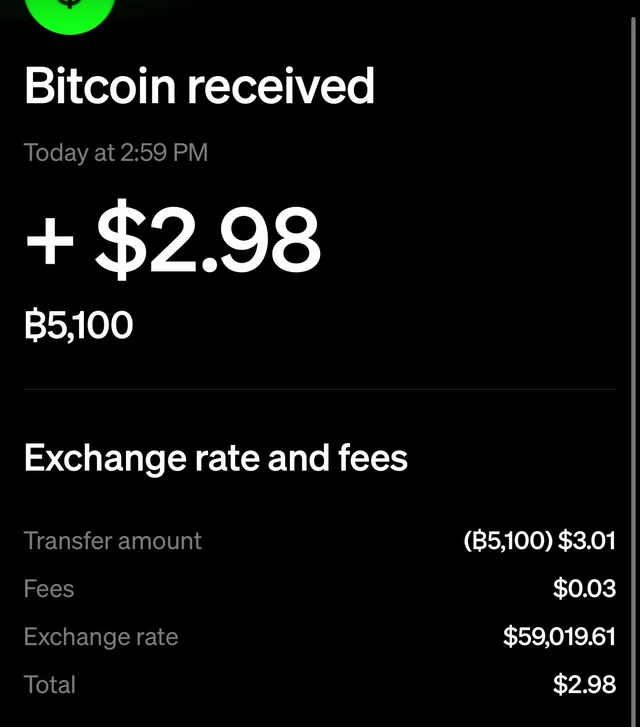
With the setting on, we sent 5,100 sats from Rizful at 2:59 PM. Our Cash balance went from $0.00 to $2.98 as Rizful showed "Payment sent!". The payment's details show the fee: a transfer of $3.01, Fees $0.03 (0.9%, rounded to the cent), total $2.98.
Why keep sats in Rizful?
- A free Lightning address to keep sats and spend them instantly: sign up at rizful.com with an email and a password.
- Receiving is free. "Sending payments costs 0.1% plus Lightning routing fees" (Rizful's FAQ).
- It works in any browser, on your phone or your computer, and your sats can pay any Lightning invoice or address, including your own Cash App.
- Want your own node and channels? Alby Hub runs your own Lightning node, and Megalith is its default channel partner.
Selling online? Your customers can pay your website in bitcoin, straight to your own wallet, and you can send it on to Cash App as dollars when you want. OpenReceive is the safe way to receive bitcoin and stablecoin payments for websites and apps: see How to Receive Lightning Payments From Cash App.
Sending bitcoin out of Cash App instead? See How to Send Bitcoin on Cash App.
FAQ
How much does it cost to buy bitcoin on Cash App?
A market buy of $1 to $499 costs 2.0%, plus a spread of up to 0.75% in the price (as of November 2026). The fee drops to 1.5% from $500, 0.9% from $1,000 and 0% from $2,000. Auto Invest and Round Ups have no fee.
What's the minimum to buy bitcoin on Cash App?
Cash App's pricing table starts at $1.
How do I sell bitcoin on Cash App and get the money in my bank?
Sell it to your Cash balance (Money tab, Bitcoin, Sell), then Withdraw to your bank: Standard is free and takes 1 to 3 business days, Instant costs 0.5% to 2.5%.
Why did my bitcoin address change on Cash App?
Cash App gives you a new address after each successful deposit. Copy the newest one from the Receive screen every time.
Can I receive bitcoin on Cash App as dollars?
Yes, over Lightning: turn on Receive Lightning as dollars (Bitcoin tile, Ways to use bitcoin). Cash App converts each payment for a 0.9% service fee. Bitcoin sent on the blockchain still arrives as bitcoin.