What Are Agentic Payments? Give an AI Agent a Lightning Wallet with a Spending Limit
Agentic payments are payments an AI agent makes on its own: it gets a bill, decides to pay it, and pays, with nobody clicking a button. The hard part isn't the paying. It's trusting software with money. Whatever you hand an agent so it can pay, a card number, an exchange key or a wallet code, lets it spend everything behind it.
With Lightning you can do better: give the agent its own small wallet, and a code that can only spend so much a month. We did exactly that, with a real agent and real sats, and filmed it paying an invoice and then being refused when it asked for more than its budget. Every number on this page is from that run (7 November 2026).
| What we used | |
|---|---|
| The agent | Claude Code, Anthropic's coding agent, in a terminal |
| How it reaches the wallet | Alby's MCP server (@getalby/mcp), through a Nostr Wallet Connect (NWC) code |
| The wallet | A new Rizful vault just for the agent, ai-agent-test@rizful.com, with 12,000 sats in it |
| The limit | The code's budget in Rizful: no more than 10,000 sats every 30 days, expiring in 90 days |
| What happened | It paid a 500-sat invoice (plus a 4-sat routing fee), then Rizful refused an 11,000-sat one: "NWC Budget Exceeded" |
Why an agent needs its own wallet, and a limit
A payment credential is all or nothing. A card number, the API key to an exchange account or a wallet's spending code lets whatever holds it spend everything the card, the account or the wallet can. An agent that misreads a prompt, gets tricked by a web page, or just loops, can do that in seconds.
Lightning gives you two limits you control yourself:
- The wallet holds only what you'd let the agent spend. A Rizful vault is its own wallet, with its own Lightning address and history, so the agent never sees the rest of your money.
- The code has a budget. An NWC code you can pay with has a spending limit and an expiry, set in the wallet. The wallet enforces it, not the agent: nothing the agent is told, or says, gets past it.
Step 1: A new vault for the agent
In Rizful (free, in any browser), open the menu and tap New Vault, then Create New Vault. Each vault has
its own Lightning address, transaction history and fiat currency settings. Rename its made-up address to something that says what
it's for: ours is ai-agent-test@rizful.com. Our guide Set Up Test Vaults for NWC
has the same steps with screenshots.
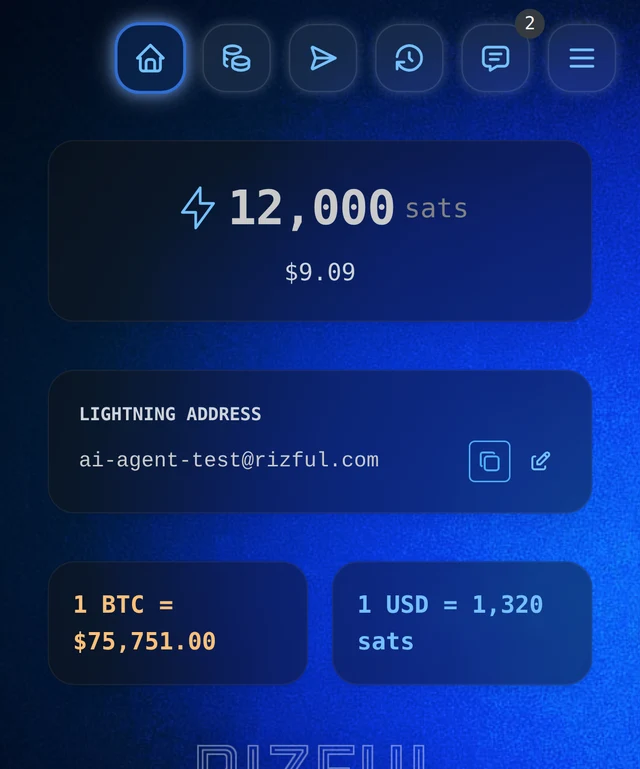
Then put in only what you'd let the agent spend. We sent it 12,000 sats (about $9 that day) from our main vault. Sats are the small units of bitcoin: a million sats is 0.01 bitcoin.
Step 2: A code with a budget
Open Menu → NWC Codes. Rizful offers two kinds of code:
- Receive-only code: "It cannot spend funds from your vault." Right for anything that only takes payments, like OpenReceive.
- Code you can pay with: "For trusted apps only. These codes can spend funds from your vault." The agent has to pay, so this is the one.
Tap Get a code you can pay with, then New Connection, then Edit. Give it a name, and set:
- Spend no more than...: the smallest budget is 10,000 satoshis (the list goes up to 50 million).
- Every...: 30 days or 1 year.
- Expire connection in...: 90 days, 1 year or 3 years.
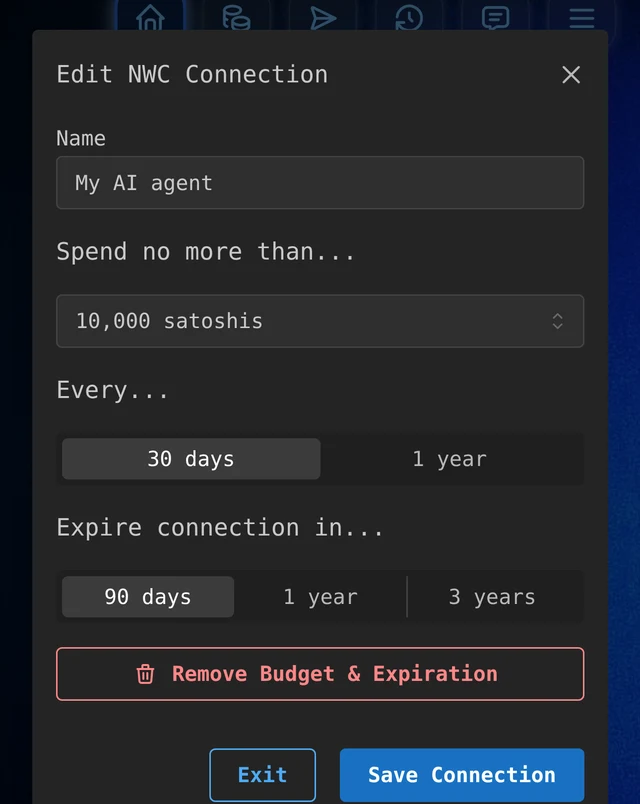
Save Connection, and the card shows 10k sats remaining. Get Connection Code shows Rizful's warning first: "Anyone who has it could spend funds from your vault!" Copy the code and give it only to the agent. Never paste it into a chat, a commit or a screenshot. Get A Send & Receive NWC Code walks through every screen.
Step 3: Give Claude Code the wallet
Alby's MCP server lets an AI agent use a Lightning wallet through an NWC code. In Claude Code it's one command (with your code in place of the dots; we kept ours in an environment variable so it never showed on screen):
claude mcp add nwc -e NWC_CONNECTION_STRING="nostr+walletconnect://..." -- npx -y @getalby/mcp
It gives the agent tools such as get_balance, pay_invoice, make_invoice, request_invoice (from a Lightning address) and
fetch_l402. We started Claude Code with permission to use them without asking us first, so that the budget was the only thing
that could stop it:
claude --allowedTools mcp__nwc
Step 4: Watch it pay, and watch the limit stop it
We asked how many sats were in the wallet. It called the wallet and answered: 12,001 sats (the extra sat was a fee reserve Rizful had returned from an earlier test).
Then a real invoice for 500 sats, made by our own Alby Hub. We pasted it in with "Pay this Lightning invoice". It paid in about two seconds: "I paid the invoice: 500 sats plus a 4-sat routing fee." On the Alby Hub: Payment Received.
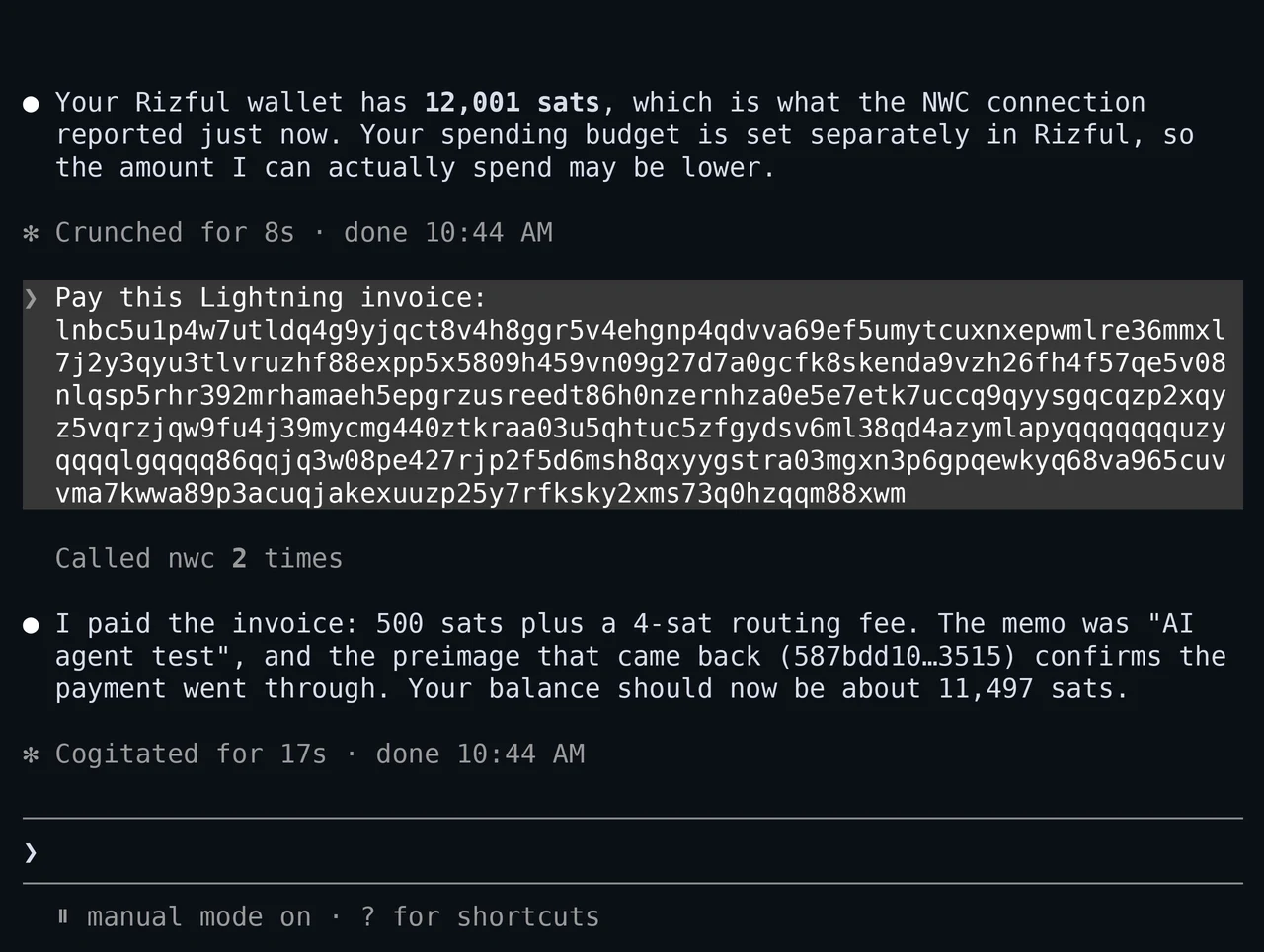
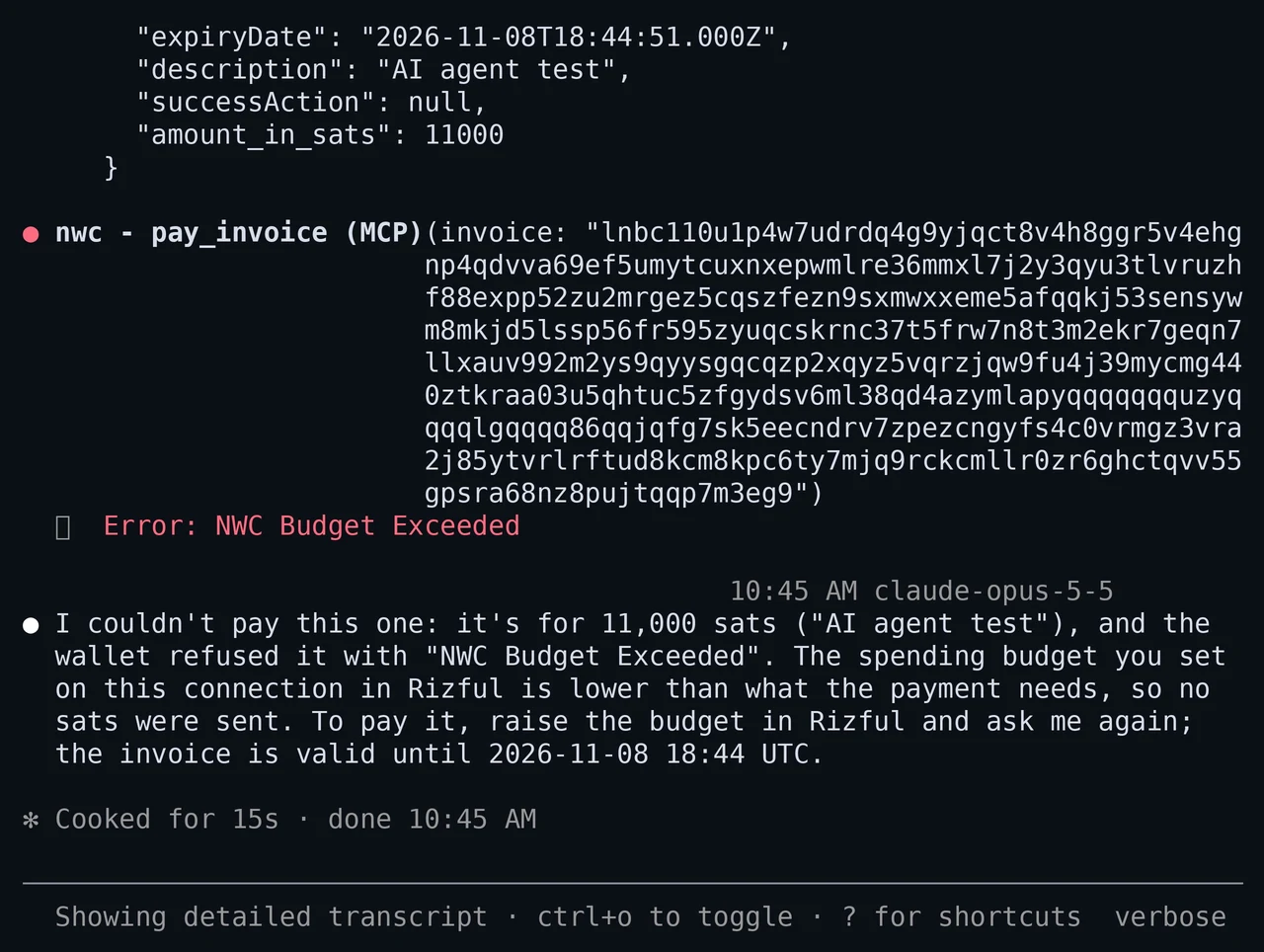
Then a bigger one: 11,000 sats. The vault still held more than that (about 11,500 sats), but the code's budget was 10,000. Rizful
refused it, and the agent said so: "I couldn't pay this one: it's for 11,000 sats ... and the wallet refused it with 'NWC Budget
Exceeded'." Not a sat was sent; the hub's invoice stayed "Waiting for Payment". In full, the tool call came back with
Error: NWC Budget Exceeded (NWC's QUOTA_EXCEEDED error).
Back in Rizful, the card showed what was left of the budget: 9.5k sats remaining. The agent itself can't read that number: Rizful
doesn't answer NWC's get_budget request, so the agent finds its limit only when a payment is refused.
When you're done, delete the code (Delete, then Yes, Delete). It stops working at once, wherever it was copied.
What's next: agents paying websites and APIs
Here the agent paid an invoice we gave it. The next step is agents paying for things on the web by themselves, with no checkout page:
- L402 (Lightning Labs' guide): the server answers
HTTP 402 Payment Requiredwith a Lightning invoice and a token; the agent pays the invoice and shows the token with the payment's preimage to get in. Alby's MCP server can already do this, with itsfetch_l402tool (it only fetches public web addresses). - x402 (Coinbase's developer docs): the same idea over HTTP 402, with stablecoins; in Coinbase's words, "USDC is the most common asset".
- Your own node: if you run Alby Hub, its app connections take budgets too, "by day, week, month, or year".
The other side: let agents (and people) pay you
If you want agents, or people, to pay your website, OpenReceive is the safe way to receive bitcoin and stablecoin payments for websites and apps. All you need to do is click Copy agent directions on openreceive.org and paste them into your coding agent; it adds the checkout. It's deposit-only: it uses a receive-only code, so your site can take payments but never spend them. No approval necessary.
For your own experiments with the raw NWC tools, see Vibe Code a Lightning App.
FAQ
What are agentic payments?
Payments made by software on its own: an AI agent sees a price or an invoice, decides to pay, and pays, without a person approving each one. The question is how much it can spend, and who enforces that.
Can an AI agent spend more than its budget?
Not with a budgeted NWC code: the wallet checks every payment against the code's budget and refuses the ones over it. Our agent was told plainly to pay 11,000 sats with a 10,000-sat budget, and Rizful answered "NWC Budget Exceeded". Two limits stack: the budget, and what's in the vault.
Which agents can use a Lightning wallet?
Any agent that speaks MCP can use Alby's MCP server: Claude Code and Claude Desktop, Goose, Cline, Windsurf, n8n and others (its README has the setup for each). Agents without MCP can use Alby CLI.
Is x402 the same as L402?
Both use HTTP's 402 Payment Required. L402 pays with Lightning invoices; x402, from Coinbase, mostly with stablecoins such as USDC.
Do I need a Rizful account?
For this setup, yes: the agent's wallet is a Rizful vault, and you sign up with an email and a password. Any wallet that gives out NWC codes with budgets works the same way, Alby Hub among them.