What Is a Lightning Address? (And How to Get One Free)
A Lightning Address is an address like satoshi@rizful.com that anyone can send bitcoin to over the Lightning Network. It looks like an email address, but it's for receiving bitcoin, and unlike a Lightning invoice you can share it once and get paid with it again and again.
You can get one free with Rizful, and check any address with the free Lightning Address Tester.
Lightning Address, Lightning Invoice or Bitcoin Address?
| Lightning Address | Lightning invoice | Bitcoin address | |
|---|---|---|---|
| Looks like | satoshi@rizful.com | lnbc10u1p... (long) | bc1q... |
| Network | Lightning | Lightning | Bitcoin (on-chain) |
| How many payments | As many as you like | One | As many as you like (a new one each time is more private) |
| Amount | The sender picks it | Usually fixed by the invoice | The sender picks it |
| Expires | No | Yes, often within an hour | No |
| Arrives | In seconds | In seconds | After a block, about 10 minutes or more |
A Lightning invoice is a one-time payment request: your wallet makes a new one for each payment, and you have to get it to the person paying. A Lightning Address does that part for you: the sender's wallet fetches a fresh invoice from your provider every time it pays. To see what's inside an invoice, paste it into the Lightning invoice decoder.
How a Payment to a Lightning Address Works
When someone pays satoshi@rizful.com, their wallet does this in about a second:
- Splits the address into the name (
satoshi) and the domain (rizful.com). - Asks the domain at
https://rizful.com/.well-known/lnurlp/satoshi. The answer says who's being paid, the smallest and largest amounts allowed, and where to ask for an invoice. - Asks for an invoice for the amount the sender typed. The provider's server makes a new Lightning invoice and sends it back.
- Pays the invoice, like any other Lightning payment.
The sender only pastes the address, types an amount and taps Pay. Because steps 2 and 3 happen on every payment, a Lightning Address only works while the server behind its domain is online. It's an open standard, LUD-16, built on LNURL-pay; the Lightning Address Tester guide has the technical details.
Get a Free Lightning Address With Rizful
Rizful is a free Lightning account that runs in any web browser. Every account comes with a Lightning Address:
- Create a free Rizful account.
- Click the edit icon next to your Lightning Address.
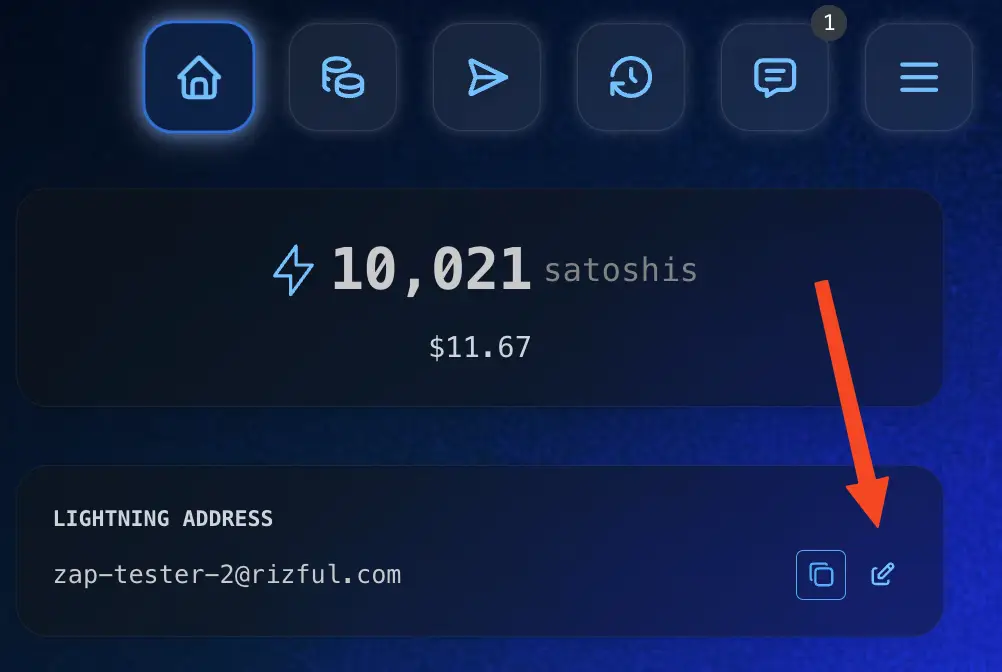
- Type the name you want, the part before @rizful.com: at least 2 characters, using letters, numbers,
-and_(not at the start or end). Then save it.
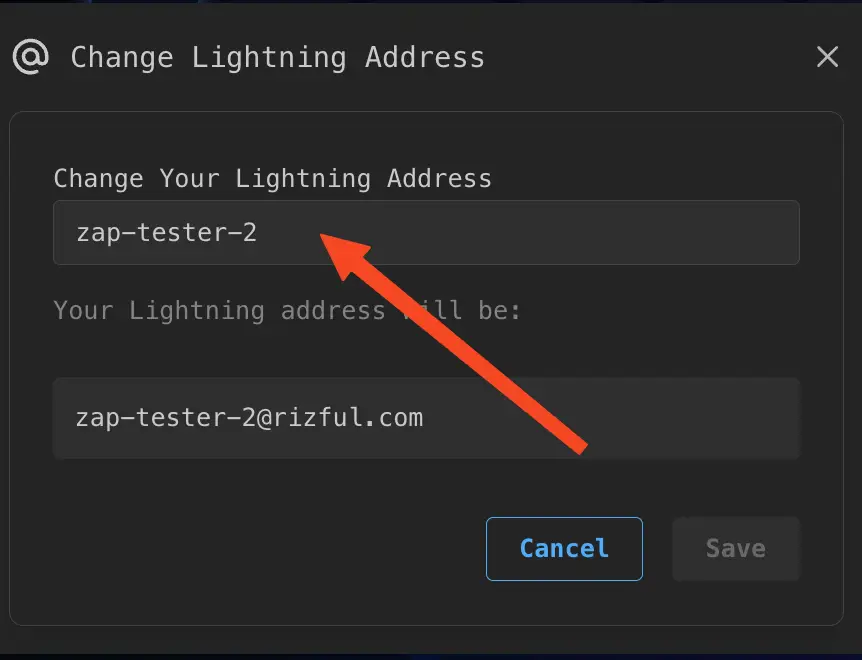
That's it: anyone can now pay yourname@rizful.com from a Lightning wallet. Receiving is free. A Rizful Lightning Address takes payments from 1 sat to 25,000,000 sats, lets the sender add a comment of up to 224 characters, and receives Nostr zaps. Each account can have up to 15 addresses, each with its own balance (see the Rizful FAQ). The first steps guide covers what to do next.
Test It Before You Share It
Paste the address into the free Lightning Address Tester. It makes the same requests a sender's wallet makes, from your browser, and shows which step fails if one does. It can also fetch a real test invoice from the address without paying it. The tester guide explains each check and how to fix a broken address.
How to Pay a Lightning Address
In a Lightning wallet, paste the address where you'd paste an invoice (or scan its QR code), type the amount, add a comment if the wallet offers one, and pay. Rizful, Phoenix, Wallet of Satoshi, Blink and Zeus all pay Lightning Addresses this way. The payment can't be reversed, so check the address first: if the name doesn't exist, the wallet shows an error and nothing is sent, but a typo that happens to be someone else's address pays them.
From Cash App
Every Cash App account already has a Lightning Address: your $Cashtag at cash.app (for example satoshi@cash.app). Cash App's help says bitcoin sent to it goes to your Bitcoin balance; Lightning isn't available in New York. To pay over Lightning, the same page describes scanning a Lightning invoice's QR code from the Payments tab.
From Coinbase
Coinbase handles Lightning with invoices. It doesn't give you a Lightning Address to receive with, and Coinbase's help center describes Lightning payments by invoice. To pay someone's Lightning Address from Coinbase, ask them for a Lightning invoice instead (in Rizful, Receive Lightning makes one). To receive on Coinbase, create a Lightning invoice there and give it to the sender.
Questions
Is it safe to share my Lightning Address?
Yes. It can only receive: people can use it to send you sats, never to take them. It's public, like an email address, so anyone who has it can see that it exists. The provider behind it sees every payment request made to it.
Is a Lightning Address an email address?
No, it only borrows the format. satoshi@rizful.com may or may not receive email. Don't send bitcoin to someone's ordinary email address and expect it to arrive; test it first.
Can I use it for Nostr zaps?
Yes. Put your Lightning Address in your Nostr profile and people can zap your posts. Rizful's addresses support zaps; the Using Rizful guides show how in Damus, Primal, Amethyst and other clients.
Does a Lightning Address work for on-chain bitcoin?
No. It only receives over Lightning. For on-chain deposits into Rizful, see How to Swap On-Chain Funds to Lightning.